Loading Table of Contents...
What Is Google Trends? How to Use It Effectively
Quick Summary
Collapse
Learn what Google Trends is and how to use it to analyze search trends, conduct keyword research, and build an effective SEO strategy.
Google Trends is a free Google tool that helps users track and analyze search trends on Google over time, by region, and by topic. With this tool, you can see how much interest a keyword is receiving, compare trends across topics, and discover content that is attracting users’ attention.
Beyond helping users understand search trends, Google Trends is also useful for SEO, Content Marketing, and market research. This article explores how Google Trends works, its key features, how to use it, and how to apply it to build an effective content strategy.
What Is Google Trends?
Google Trends is a free search-trend analysis tool provided by Google. It allows users to explore interest in a keyword or topic across different periods and geographic locations.
Rather than simply showing how many searches a keyword receives, Google Trends focuses on changes in users’ interest. This helps you identify whether a topic is becoming more popular, losing traction, or being searched more frequently at certain times.
This tool is particularly useful for SEO professionals, marketers, content creators, and businesses looking to understand market demand before launching business activities.
How Does Google Trends Work?

Google Trends analyzes a sample of Google search data and normalizes the results to show the relative interest in each keyword or topic.
When a user enters a keyword, the tool processes the data based on selected conditions, such as:
- Time: Track trends over an hour, a day, several months, or years.
- Geographic region: Analyze interest in a specific country or region.
- Category: Narrow results to a field relevant to your research.
- Search type: Analyze data from Google Search, Google Images, Google News, Google Shopping, or YouTube Search.
After processing, Google Trends presents the results through visual charts and tables, making it easy to observe changes in search trends.
Where Does Google Trends Data Come From?
Google Trends data comes from a sample of actual searches on Google. The tool does not use every search; instead, it applies sampling to analyze and display trends.
Google Trends also normalizes data by time and geographic location. This allows users to compare relative interest across regions with different population sizes and search volumes.
However, Google Trends does not reflect all search demand across the Internet. Its results represent data within the services and analysis conditions supported by the tool.
What Does the 0–100 Index in Google Trends Mean?
Google Trends uses a scale from 0 to 100 to represent relative interest in a keyword or topic.

|
|
|
|
|
|
|
|
|
|
|
|
|
|
|
|
|
|
For example, when analyzing the keyword “Christmas gifts” over five years, the chart may reach 100 in December and fall to lower levels in other months. This indicates seasonal demand that typically rises as Christmas approaches.
Note that an index of 100 does not mean 100 searches, and an index of 50 does not mean 50 searches. These are relative values calculated within the selected analysis.
Key Features of Google Trends
Google Trends offers features for tracking trends, comparing keywords, and discovering topics people are interested in. These features support search-demand research and market-aligned content planning.
Explore Search Trends Over Time
Interest over time lets you track interest in a keyword over a selected period. Google Trends displays the data as a line chart, with time on the horizontal axis and the interest index from 0 to 100 on the vertical axis.
The chart can help you identify:
- Whether search interest is rising, falling, or stable.
- When a keyword receives the most interest.
- Changes in search demand by season or year.
- Sudden spikes that may be associated with an event or new trend.
This feature is useful for businesses deciding when to launch Marketing campaigns or publish SEO content.
Track Search Trends by Geographic Region
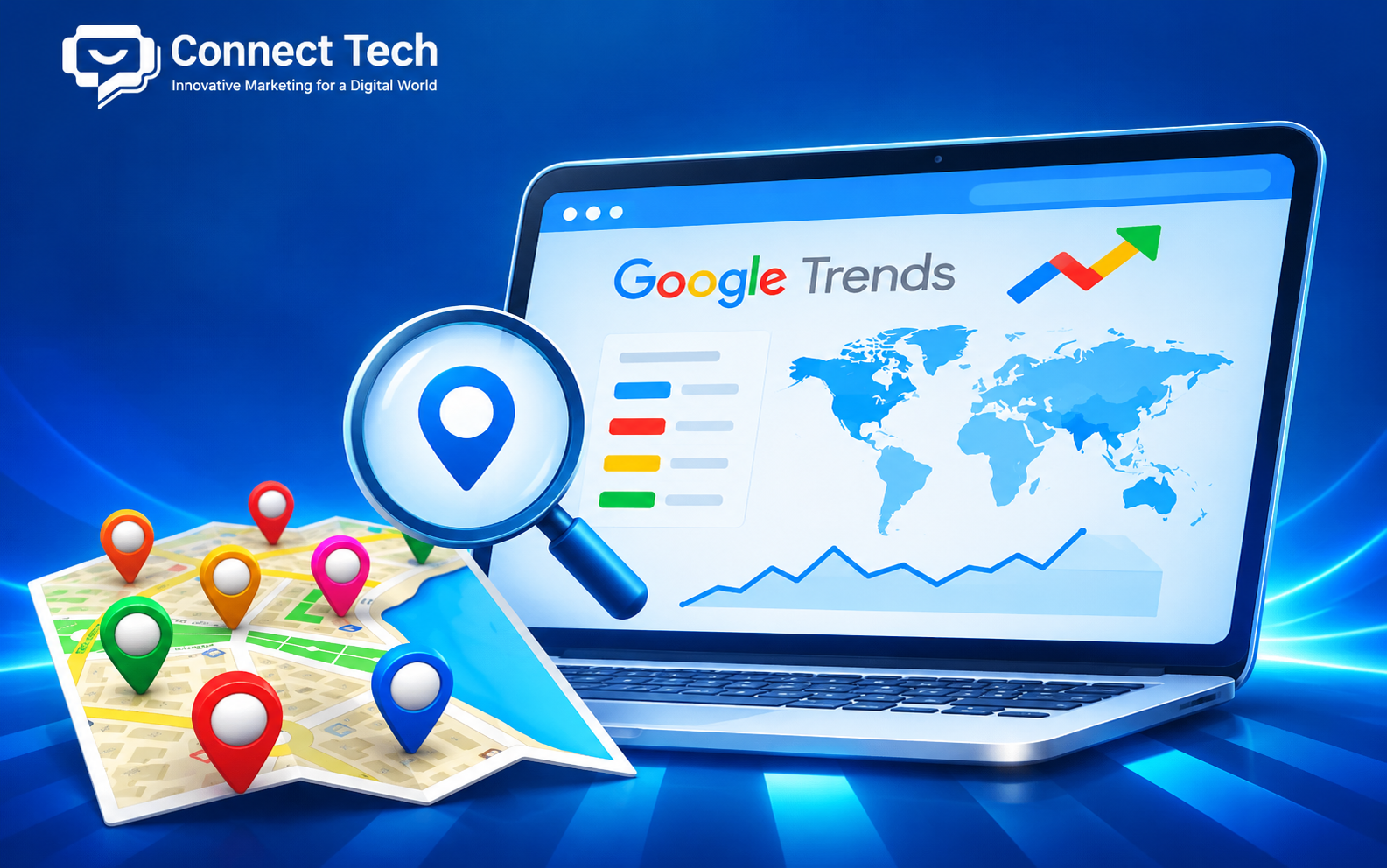
Interest by region lets you analyze keyword interest across different geographic areas. Data is displayed as a map and ranking, helping identify locations with relatively high interest in a topic.
For example, when researching searches related to website design services in Vietnam, a business can use Google Trends to see which regions show notable interest.
However, a region with a high index does not necessarily have the largest total search volume. Google Trends normalizes data based on each region’s share of searches, so other data sources should be used to assess market size.
Compare Interest Across Keywords
Compare allows users to compare up to five keywords or topics in a single analysis. Each keyword appears as a separate line, making differences in trends easier to see.
You can use this feature to:
- Compare interest in products or services.
- Analyze trend changes among related topics.
- Identify keywords with clear seasonality.
- Track shifts in users’ interest over time.
For SEO, comparison helps evaluate trends across keyword groups before creating a content plan. However, higher interest does not necessarily mean better conversion potential or SEO performance.
Explore Related Topics and Search Queries
Google Trends provides two important data groups: Related Topics and Related Queries. Related Topics shows topics users tend to search for, while Related Queries shows searches associated with the keyword or topic being analyzed.
Both groups are generally divided into:
- Top: Topics or queries with notable relative interest.
- Rising: Topics or queries showing notable growth compared with the previous period.
The Breakout label indicates a query experiencing very strong growth, typically more than 5,000% compared with the comparison period.
SEO professionals can use these related data points to discover alternative wording, search needs, and topics for expanding website content.
Stay Updated on Trending Searches
Trending Now helps users monitor searches that are surging in supported regions. It provides information about prominent topics, interest levels, and recent trend developments.
For content creators, this feature can help:
- Discover new topics attracting attention.
- Track events that influence search behavior.
- Find ideas for news or trend-driven content.
- Assess when to launch communications campaigns.
Not every trend is suitable for long-term SEO content. Businesses should prioritize topics relevant to their industry and target customers.
What Are the Benefits of Google Trends?
Google Trends helps individuals and businesses better understand search demand, changes in interest, and when users begin paying attention to a topic. This data can support activities ranging from market research to SEO and Marketing.
Understand Search Trends and User Demand
Google Trends tracks changes in interest in specific products, services, or topics. Instead of relying solely on intuition, businesses can use trend data to identify topics attracting attention and needs that may be declining.
This information helps Marketing teams better understand changes in search behavior and adjust their messaging and content direction accordingly
Support Keyword Research and SEO Strategy
Google Trends supports keyword research with data about interest over time, by region, and through related queries. SEO professionals can identify growing topics, assess seasonality, and discover emerging search needs
However, Google Trends does not provide all metrics, such as absolute search volume, keyword difficulty, or SEO competition. Use it alongside Google Keyword Planner, Google Search Console, or specialized keyword-research platforms
Identify the Right Time to Publish Content
Google Trends helps identify times of year when search demand typically rises. In seasonal industries such as travel, education, gifts, or fashion, understanding search cycles allows businesses to prepare content before demand surges
SEO teams can therefore create an appropriate publishing schedule and allow content time to be crawled, indexed, and potentially improve rankings before peak season
Research Markets and Customer Behavior
Google Trends offers additional insight into user interest in products, services, and topics across regions. Businesses can compare product groups, track changes in demand, or discover markets with notable interest
Although it does not replace in-depth market research, Google Trends is a useful reference during customer research and business-opportunity evaluation
How to Use Google Trends: A Detailed Guide
To use Google Trends, visit the tool’s website, enter a keyword, and configure the appropriate filters. It displays trend charts, regional data, and related queries for analysis
Here are seven steps for beginners:
Step 1 – Visit Google Trends and Enter a Keyword
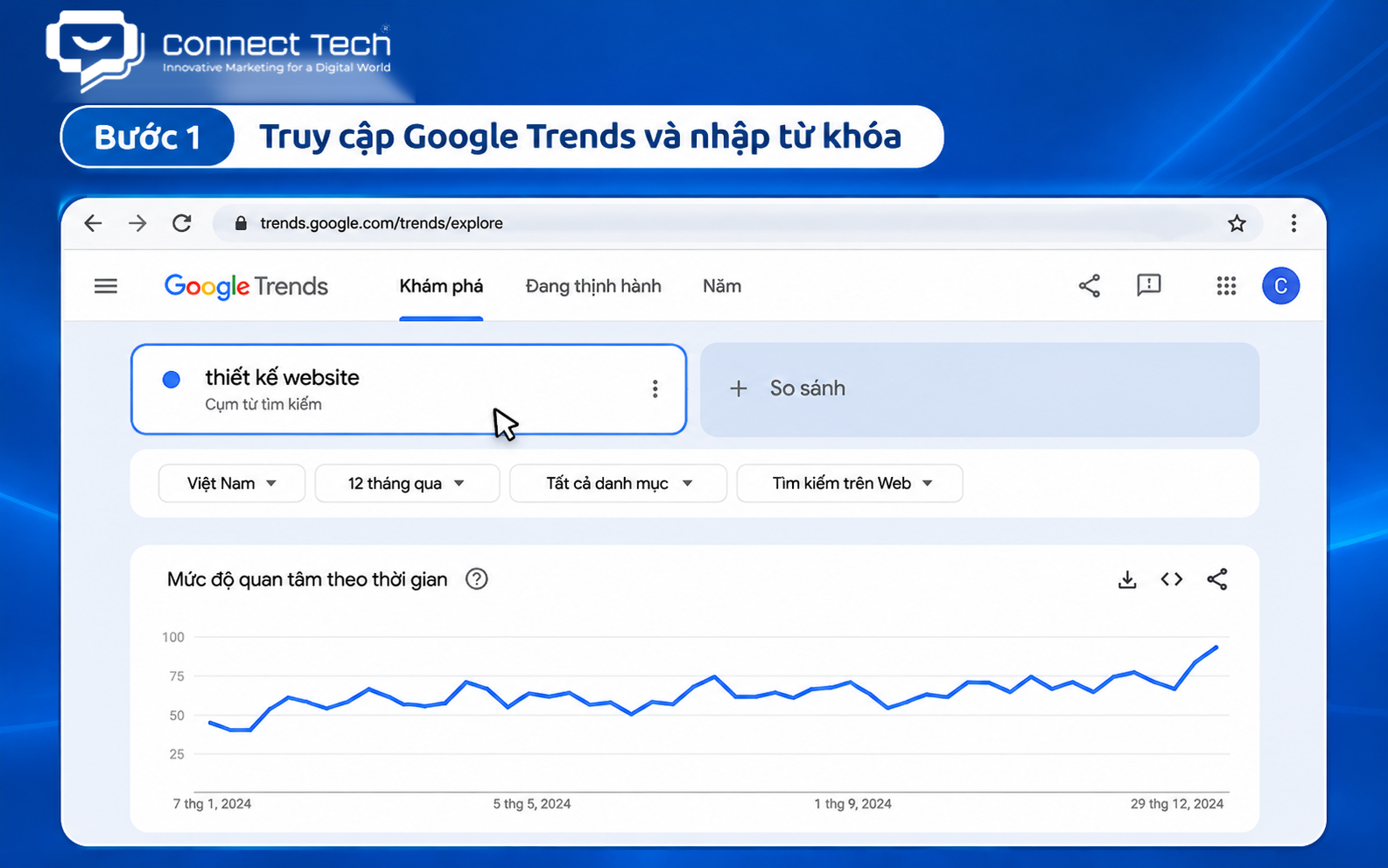
First, visit the official website at trends.google.com. On the main interface, select Explore to begin keyword analysis, then enter the keyword or topic you want to research
Google Trends may offer different options, including a search term and a topic. Choose the correct item so the data reflects your research needs
For example, entering “website design” lets you view interest in the phrase in Vietnam and track how the trend has changed in recent years
Step 2 – Set Filters for Region, Time, and Category
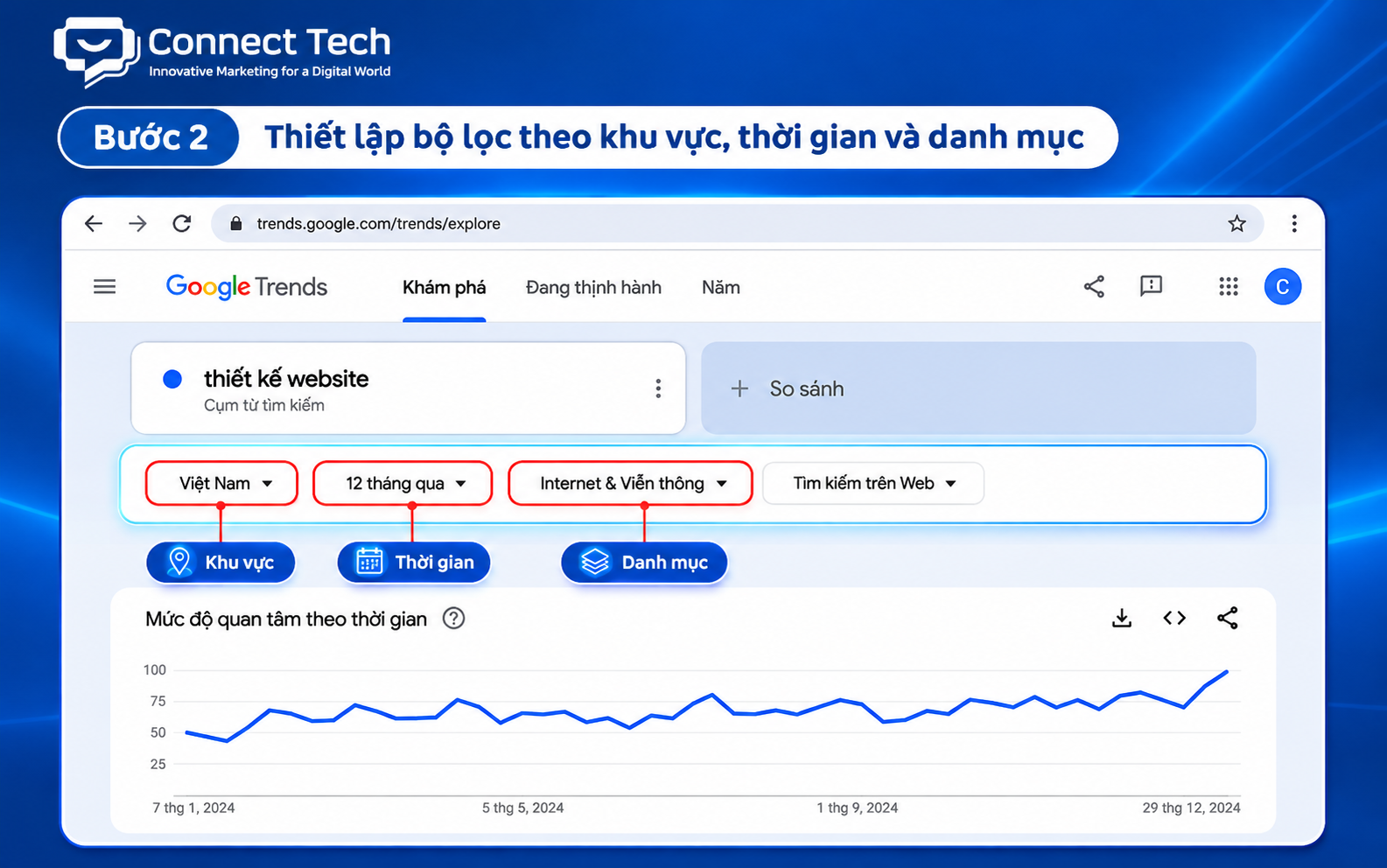
After entering a keyword, Google Trends lets you adjust filters to narrow the analysis. Key filters include:
|
|
|
|
|
|
|
|
|
|
|
|
|
|
|
Choosing appropriate filters helps focus research on the right audience and target market. If researching SEO keywords for a website in Vietnam, select Vietnam and Web Search. For seasonal keywords, a 3–5-year period is often more useful for observing recurring cycles
Step 3 – Analyze the Interest-over-Time Chart
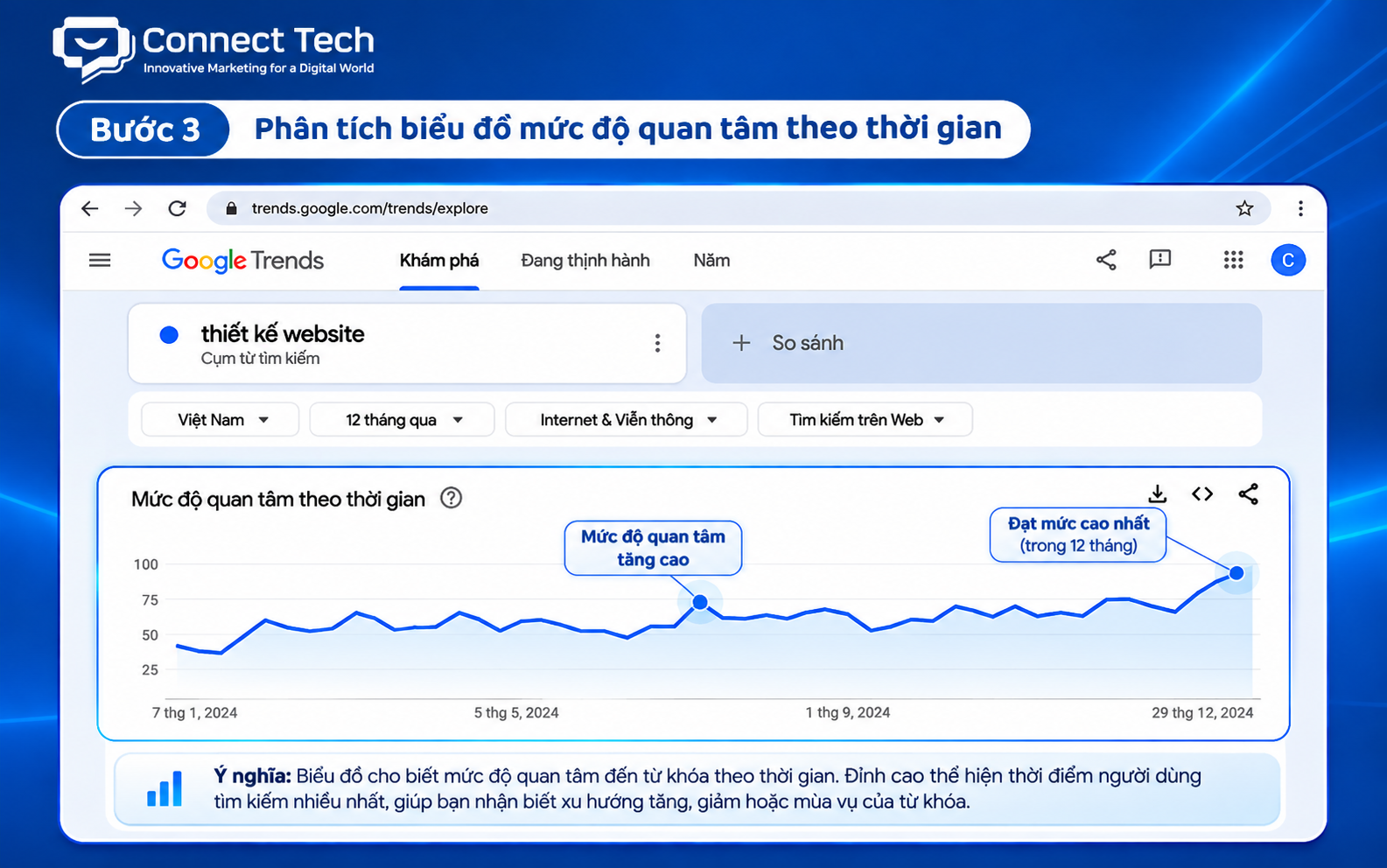
After filters are set, Google Trends displays Interest over time, showing keyword interest during the selected period. When reading the chart, pay attention to three factors:
- Overall trend: A rising line may indicate growing interest, while a sustained decline may suggest waning interest.
- Peak periods: High points indicate periods of notably high relative interest.
- Stability: Keywords with relatively stable interest may be suitable for long-term SEO content.
A sudden spike alone does not prove that market demand is growing sustainably. Check a longer period and investigate what caused the fluctuation
Step 4 – Explore Search Trends by Region
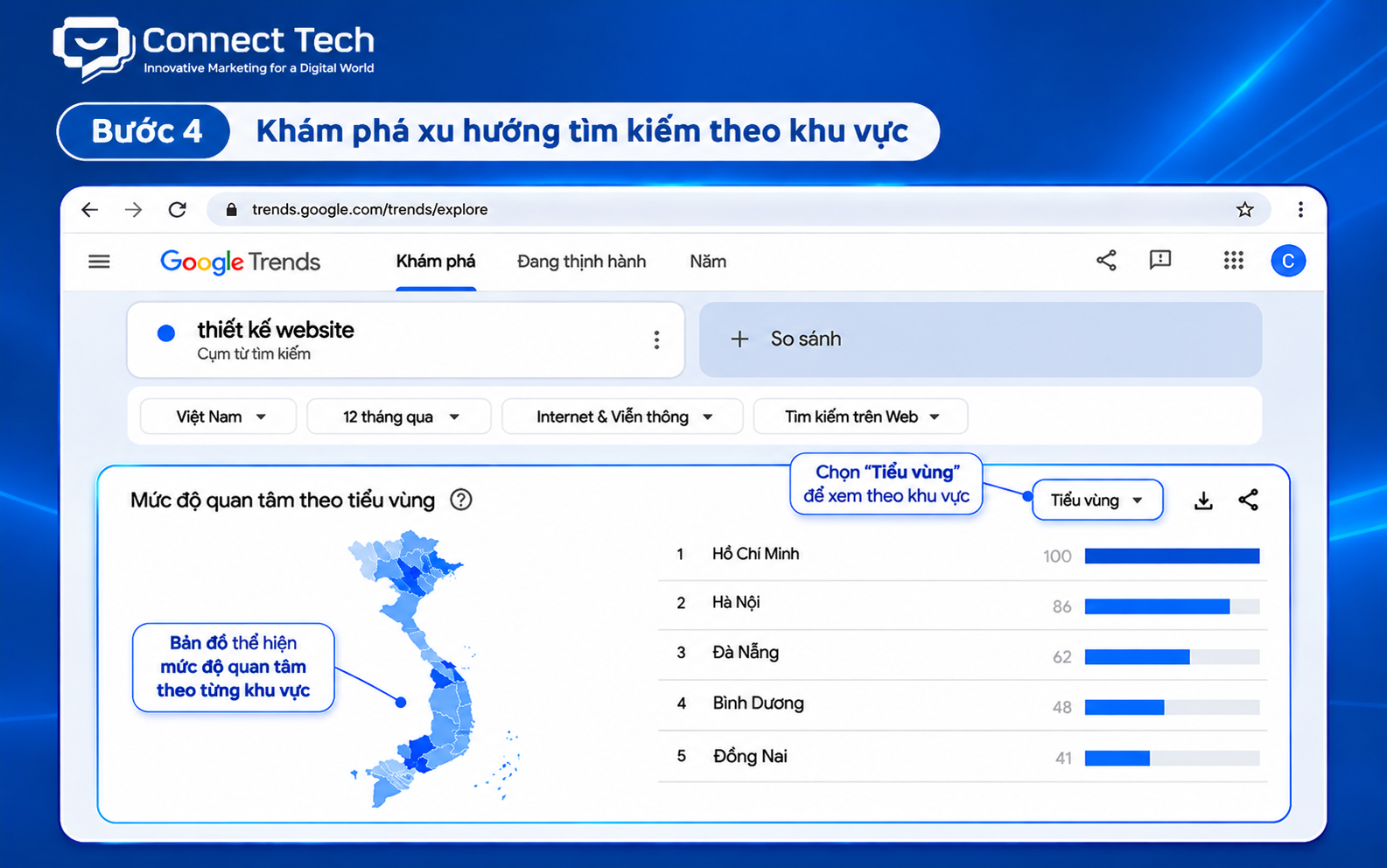
Below the time chart, Interest by region shows keyword interest across different geographic areas, typically through a map and rankings based on relative indices
Use this data to identify locations with a notable share of searches for a topic. It can be useful for market research or creating region-specific content
Remember that regional indices do not directly represent the size of a potential customer base. A smaller area with relatively high interest may still have fewer searches than a larger market
Step 5 – Analyze Related Topics and Keywords
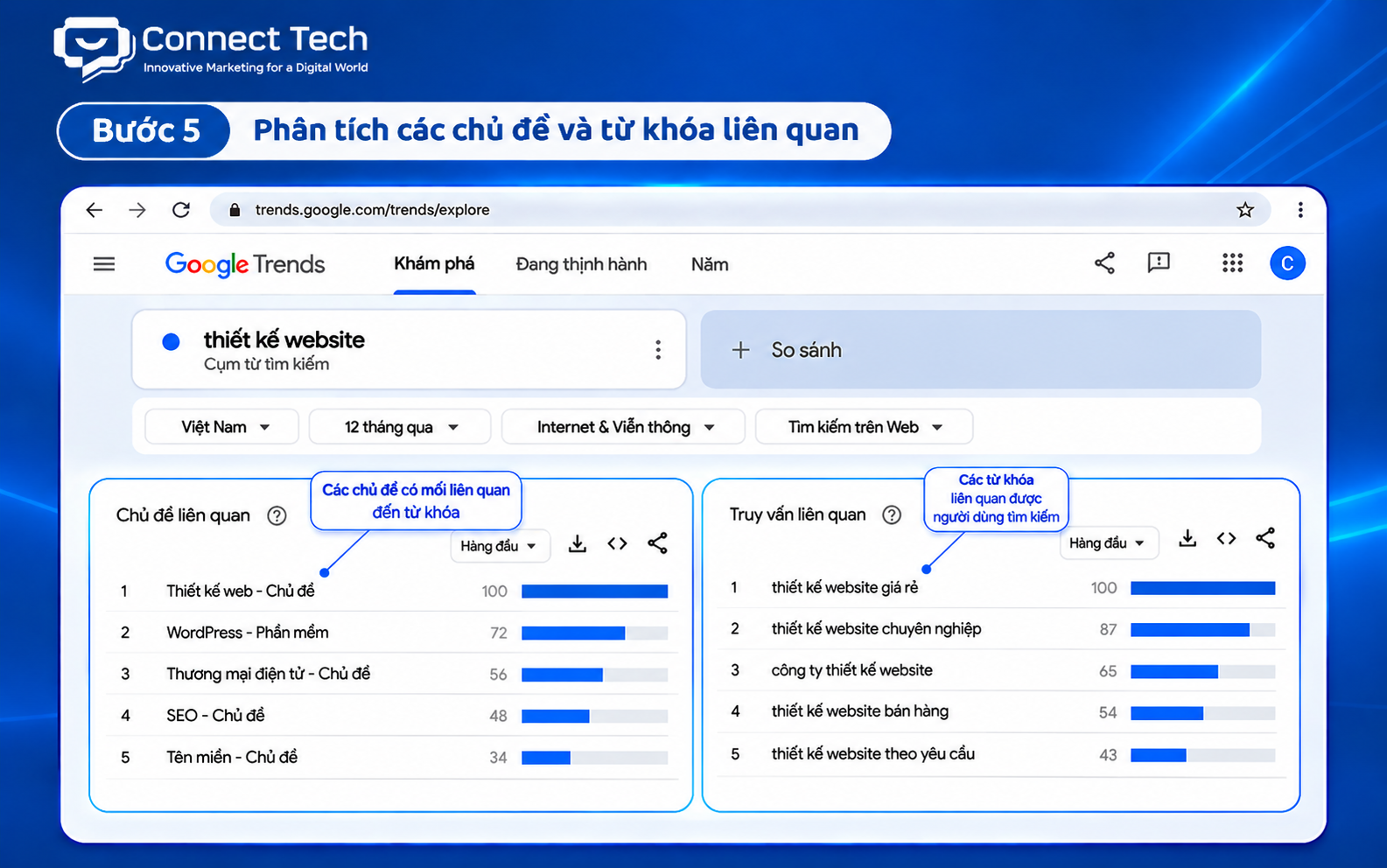
Related Topics and Related Queries help you discover additional content related to the keyword you are researching. Each section lets you switch between:
- Top: Topics or queries with notable relative interest.
- Rising: Topics or queries showing notable growth compared with the previous period.
For SEO, Related Queries can help expand your keyword list and suggest questions, needs, or problems users are interested in
However, do not add every related query to a single article. Group them by Search Intent to determine which belong in the current article and which should become separate articles
Step 6 – Compare Trends Across Multiple Keywords
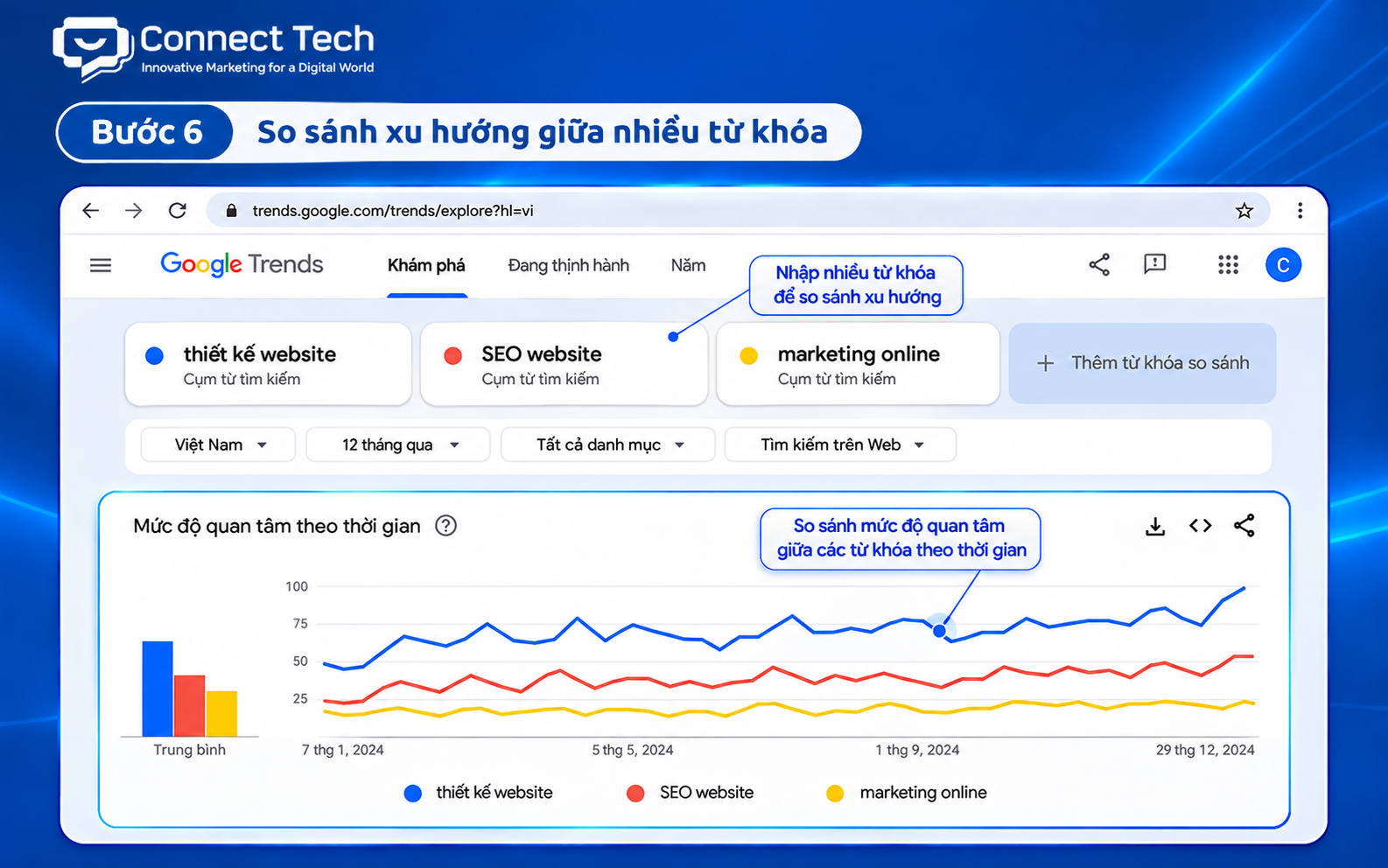
Google Trends can compare up to five keywords or topics on the same chart. Select Compare and add the keywords you want to analyze. The tool displays their trend lines so you can compare interest
Make sure keywords are analyzed under the same time, region, and search-type conditions. Adding or changing comparison keywords can alter the chart’s normalization scale, so avoid directly comparing indices from charts with different conditions
Step 7 – Export Data for Further Analysis
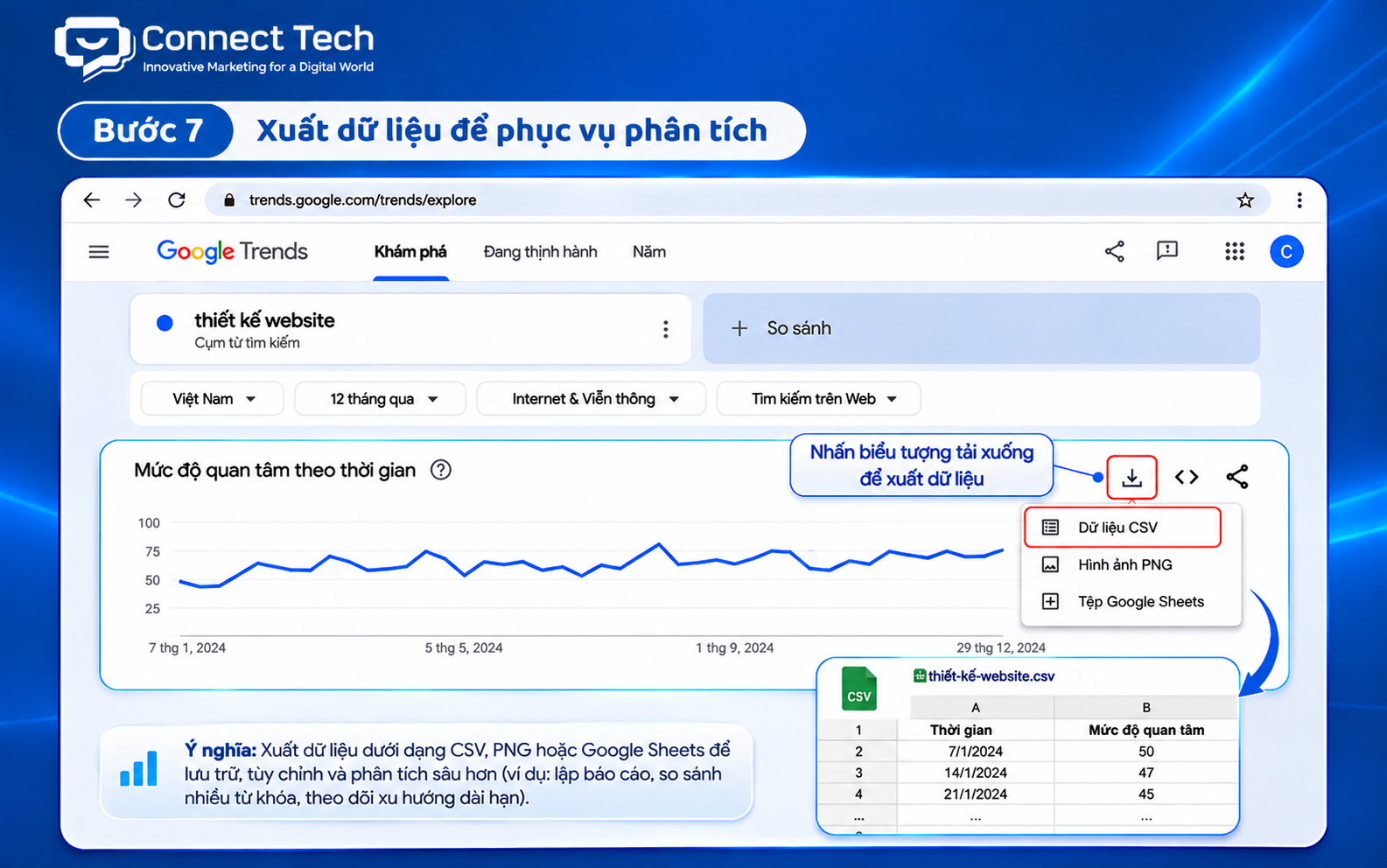
Google Trends lets you download data from some charts and tables in CSV format. Find the download icon in the results area and select Download CSV
Open the downloaded data in Microsoft Excel or Google Sheets for further analysis. You can summarize monthly trends, compare periods, or create keyword tracking sheets. Saving research also helps SEO teams compare data when updating content plans
How to Use Google Trends Effectively for SEO
Google Trends supports SEO by helping content professionals identify search trends, discover keyword opportunities, and choose the right time to publish. Combined with other keyword-research tools, its data can contribute to an SEO strategy grounded in actual user needs
Find Keyword Ideas and Article Topics
Google Trends helps generate content ideas by analyzing topics and queries related to a primary keyword. Start with a broad keyword in the field you are researching, then review Related Topics and Related Queries to discover topics tied to customer needs
Group collected keywords by search intent, such as informational research, solution comparison, or service searches. This approach helps build a connected topical content structure instead of publishing disconnected articles
Identify Keywords Gaining Momentum
Google Trends can reveal rising interest through the time chart and Rising Queries. Review growth across multiple periods to determine whether a trend is sustained
A keyword that spikes over a few days may be tied to a temporary event. A keyword that keeps rising for months may warrant deeper research into search demand
To evaluate an SEO opportunity, combine trend data with estimated search volume, competition, Search Intent, and your website’s ability to satisfy the query
Analyze Keyword Seasonality
Google Trends is particularly useful for keywords whose demand changes seasonally or at particular times of year. Multi-year data helps identify when interest typically rises and whether the cycle repeats
For example, searches related to Lunar New Year gifts, summer travel, or admissions often vary by season. Historical data helps businesses prepare content before peak periods
For SEO, content should be created and optimized early to allow time for crawling, indexing, and ranking
Build an SEO Content Plan Around Search Trends
Google Trends helps plan SEO content by providing insight into interest levels and topic changes. You can divide content into two main groups:
|
|
|
|
|
|
|
|
|
|
|
|
An effective Content SEO strategy should combine both. Evergreen Content helps a website reach users over the long term, while Trending Content creates opportunities to address emerging search needs
Topic selection should still be based on relevance to your business, target audience, and business objectives
Combine Google Trends with Google Keyword Planner and Google Search Console

Google Trends is more valuable when combined with tools that provide different types of data
|
|
|
|
|
|
|
|
|
|
|
|
|
|
|
|
For a keyword, use Google Trends to examine interest trends, Google Keyword Planner for search-volume estimates, and Google Search Console to review the performance of published content
Note that the competition metric in Google Keyword Planner primarily reflects advertising competition, not organic SEO difficulty
Combining sources makes keyword selection more evidence-based and reduces reliance on a single metric
Advantages and Limitations of Google Trends
Google Trends is useful for studying search trends, but its data has limitations. Understanding both its strengths and weaknesses helps users choose an appropriate analysis method
|
|
|
|
|
|
|
|
|
|
|
|
|
|
|
|
|
|
|
|
|
Overall, Google Trends is best suited to analyzing trends and relative search interest rather than measuring a keyword’s search volume precisely
For SEO, treat it as a supplementary data source for research, planning, and evaluating content opportunities
Things to Keep in Mind When Using Google Trends
To use Google Trends effectively, understand how it processes data and what factors may affect the results. Misreading indices or choosing inappropriate filters can lead to inaccurate conclusions about search demand
Do Not Confuse Trend Indices with Actual Search Volume
Google Trends shows relative interest, not the exact number of searches for a keyword. An index of 100 represents the peak within the analyzed data, while other values are calculated relative to that peak
Therefore, you cannot use Google Trends to determine how many monthly searches a keyword receives. For search-volume estimates, consult Google Keyword Planner or other suitable keyword-research tools
Choose Appropriate Time Periods and Regions
Time and region directly affect Google Trends data. A keyword may surge over a short period without sustaining the trend long term. Likewise, interest in the same topic can differ across countries or local areas
Choose your analysis scope based on your research goal. For long-term trends, prioritize several years of data. For a new event or trend, a shorter period may be more suitable
When comparing multiple keywords, keep filters consistent so the results are comparable
Distinguish Search Terms from Topics
Google Trends offers two research types: Search Term and Topic. Search Term focuses on the entered search phrase, while Topic represents a broader subject and may include related wording and multiple languages
This difference affects the scope of the analyzed data. Search Term is generally suitable for researching a specific phrase. Topic can provide a broader view when assessing interest in a general concept or subject
Check which type of data you are using before analysis to avoid confusing interest in a particular phrase with interest in the broader topic
Do Not Choose SEO Keywords Based Only on Short-Term Trends
A keyword showing high growth on Google Trends does not necessarily deliver long-term SEO results. Some trends are driven by events, news, or short-lived media attention. Once interest fades, search demand may return to a low level
Before selecting keywords for SEO, also evaluate website relevance, Search Intent, competitiveness, and value to your target audience
For topics with sudden spikes, define whether your goal is short-term traffic or developing content with lasting value
Google Trends is a useful tool for analyzing search trends, exploring market demand, and supporting SEO keyword research. By tracking interest over time, across regions, and by topic, it helps individuals and businesses make more data-informed decisions when developing content and running Marketing activities
However, Google Trends does not show absolute search volume and cannot fully replace specialized SEO tools. To get the most from it, combine trend data with Google Keyword Planner, Google Search Console, and Search Intent analysis to select topics that align with user needs and your website’s growth goals

Table of Contents