Loading Table of Contents...
What Is a Link? Understanding Different Types of Links in SEO
Quick Summary
Collapse
Learn what a link is, how links work, their common types, and how to use them effectively in SEO to optimize your website and improve user navigation.
A link allows users to navigate from one piece of content to another web page, image, video, or resource on the Internet. Beyond supporting navigation, links help search engines discover content and understand website structure. Join Connect Tech as we explore how links are structured, how they work, their different types, and best practices for improving user experience and supporting SEO.
What is a link?
On the Internet, a hyperlink is the full term for a clickable or tappable connection that allows users to access another resource. Instead of manually entering a website address, you can reach your desired content with a single action.
Links appear in various forms, including differently colored text, images, icons, logos, and buttons on websites.
When using links, many people confuse the following terms:
|
|
|
|
|
|
|
|
|
|
|
|
|
|
|
|
|
|
|
|
|
|
|
|
Simply put, a URL is like the address of a destination, while a clickable element serves as the means of getting there. A URL displayed as plain text is not necessarily clickable.
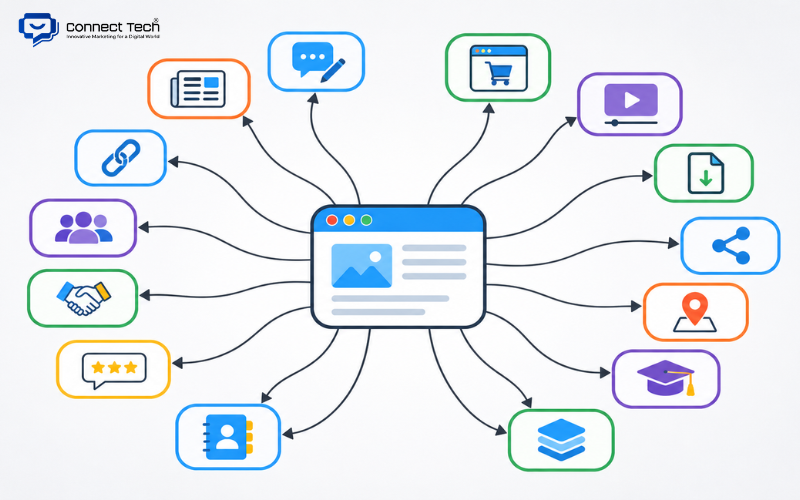
The structure of a link and how it works
A text-based link typically consists of two basic components: visible content and a destination address. The URL itself may contain several elements that help the browser identify the exact resource to access.
Consider the following example:
https://example.com/blog/seo?source=email#huong-dan
|
|
|
|
|
|
|
|
|
|
|
|
|
|
|
|
|
|
|
|
|
|
|
|
Not every URL contains all these components. A homepage address, for example, may consist only of the HTTPS protocol and a domain name.
During website development, developers commonly use two types of URLs:
- Absolute URL: Contains all the information needed to identify a resource, such as https://example.com/blog.
- Relative URL: Identifies a resource based on the current document's base URL, such as /blog.
When you click on content with an assigned destination address, the browser identifies the requested resource and performs the necessary actions to display it.
For a typical web page, this process may involve the following steps:
- The user clicks on text, an image, or a button.
- The browser identifies the destination URL.
- The Domain Name System (DNS) helps resolve the server address if necessary.
- The browser sends an HTTP or HTTPS request.
- The server processes the request and returns the data.
- The browser displays the received content.
The actual process may be simpler if the browser has already cached the resource. When clicking an article's table of contents, for example, the browser may simply scroll to the corresponding section without reloading the entire page.
Common types of links
Website links can be classified according to their direction, technical attributes, display format, and intended purpose. Understanding each category helps you choose the appropriate type for different situations.
Classification by link direction
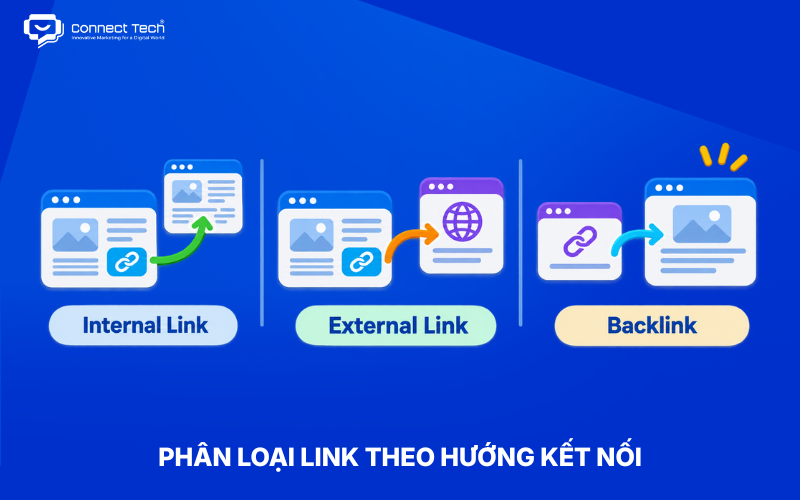
In SEO, there are three fundamental types of links that website administrators should understand:
Internal link
An internal link connects pages within the same website. Its primary purpose is to help users discover related content and enable search engines to understand the website's information structure.
For example, an article about website design may direct readers to a service page or an article about UX/UI within the same domain.
External link
An external link directs users from the current website to another website. Content writers commonly use this type of connection to cite sources, introduce tools, or provide additional reference materials.
Linking to trustworthy sources helps readers verify information and expand their knowledge.
Backlink
A backlink occurs when another website directs users to your website. In addition to generating traffic, backlinks can contribute to the signals search engines use to evaluate content.
It is important to understand that the same connection can be considered an outbound link from the source website's perspective and a backlink from the destination website's perspective.
Classification by SEO attributes
HTML allows website administrators to use the rel attribute to provide additional information about the relationship between the source page and the destination page.
Below are four common categories:
|
|
|
|
|
|
|
|
|
|
|
|
|
|
|
|
|
|
|
|
Dofollow is a commonly used term in the SEO community rather than a required HTML attribute. Meanwhile, Nofollow does not prevent users from accessing a resource, nor does it guarantee that Google will not index the destination page.
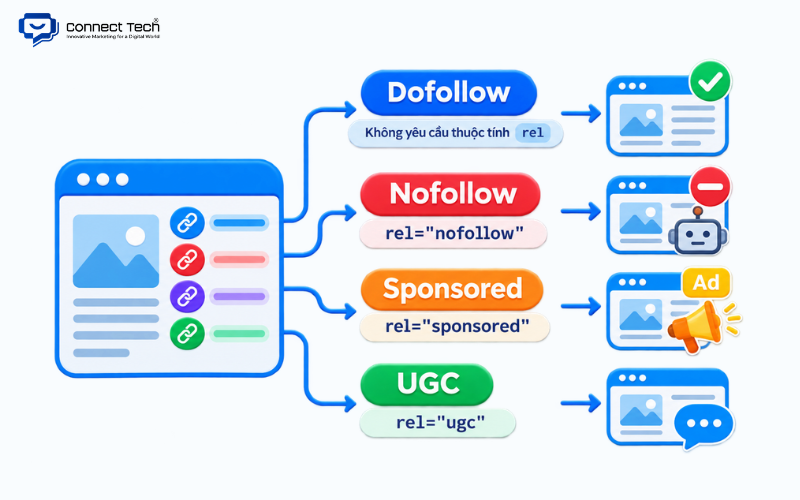
According to the official Google Search Central guidelines, you should use Sponsored for advertisements or sponsored content. Google also accepts Nofollow in these situations.
Classification by format and purpose
Beyond SEO classifications, links appear in various formats to serve different user needs.
|
|
|
|
|
|
|
|
|
|
|
|
|
|
|
|
|
|
|
|
|
|
|
|
|
|
|
|
|
|
These categories are not mutually exclusive. An advertising image, for example, may direct users to an external website, contain campaign tracking parameters, and carry a Sponsored attribute at the same time.
How to copy and create a link
How to copy a website address
You can copy a web page's URL directly from your browser without installing additional tools.
On a computer:
- Open the web page you want to share.
- Click the address bar or press Ctrl + L.
- Press Ctrl + C to copy the URL.
- Press Ctrl + V to paste it wherever needed.
On a mobile device:
- Open the web page or content you want to share.
- Select the share icon or the browser's address bar.
- Choose the copy option.
- Paste the address into a message, email, or another application.
When using Google Drive or other cloud storage platforms, check the access permissions before sharing. Recipients may be unable to open a document if its owner has not granted the necessary permissions.
You should also avoid removing URL parameters without understanding their functions, as some may affect the displayed content or access permissions.
How to create and insert links into website content
Content management systems such as WordPress typically provide a built-in feature for adding destination addresses to text.
The process is relatively simple:
- Highlight the text you want to link.
- Select the hyperlink icon or use the Ctrl + K keyboard shortcut.
- Enter the destination URL.
- Confirm and save the content.
- Check whether the link works correctly after publishing.
If you are building a website using HTML, you can use the tag together with the href attribute.
For example:
In this code, href specifies the destination address, while Connect Tech is the visible text displayed to users. You can refer to our article on how to use the HTML anchor tag to learn more about its syntax and supported attributes.
How to use links effectively in SEO
To build a navigation system that delivers practical value, you should prioritize relevance, content quality, and user needs rather than focusing solely on quantity.
The following principles will help you understand and apply SEO-friendly linking practices to your website:
- Place links in relevant contexts: Only direct readers to content that explains, supplements, or expands on the information being discussed. Avoid inserting a URL simply to increase the number of connections in an article.
- Optimize anchor text naturally: Visible text should help readers understand what the destination page contains. Limit generic phrases such as “click here” or “read more” when they do not provide sufficient context.
- Prioritize trustworthy sources: When citing information, choose official documentation, research reports, or websites with relevant expertise.
- Build a logical internal linking structure: Connect articles covering related topics through the Topic Cluster model. Ensure important pages can be discovered through other content on your website.
- Ensure crawlability: Use the HTML tag with a valid href attribute so Google can identify the destination URL.
- Use appropriate attributes: Mark advertisements, sponsored content, and user-generated content with suitable rel values.
- Improve accessibility: Design recognizable text and navigation buttons, support keyboard navigation, and provide descriptive information for people using screen readers.
- Avoid ranking manipulation: Do not buy or sell backlinks to manipulate rankings, participate in excessive link exchanges, or use automated tools to generate large numbers of artificial connections.

How to identify and fix common link issues
When updating content or changing a website's structure, some URLs may stop functioning as intended. This affects the user experience and makes it more difficult for search engines to discover related pages.
|
|
|
|
|
|
|
|
|
|
|
|
|
|
|
|
|
|
|
|
|
|
|
|
|
|
|
|
|
|
|
|
If a page has been permanently removed and no equivalent replacement exists, you can retain its HTTP 404 or 410 status and remove internal links pointing to that page.
You can also use SEO tools to identify issues, analyze backlinks, and evaluate the effectiveness of your website's navigation structure.
|
|
|
|
|
|
|
|
|
|
|
|
|
|
|
|
|
|
|
|
|
If you are new to website management, you can start with Google Search Console to monitor data and use Screaming Frog to identify navigation issues.
Keep in mind that Google Search Console reports provide only a portion of the available data rather than a complete list of every backlink Google has discovered. For more advanced analysis, you can explore Ahrefs or the Semrush SEO tool.
Understanding what a link is helps you grasp one of the fundamental components of the Internet while learning how to organize content, improve navigation, and support SEO. Instead of focusing on quantity, prioritize quality, relevance, and the value each connection provides to users.
Follow Connect Tech to stay updated with useful insights into SEO, website design, and digital marketing, helping you build a more effective website and achieve sustainable growth.

Table of Contents