In today’s era of booming online shopping, the demand for convenient and secure payment methods is higher than ever. To meet this trend, Shopee has introduced ShopeePay, a digital wallet integrated directly into the Shopee app, offering users fast, secure transactions along with exclusive rewards.
With ShopeePay, users can not only make seamless payments when shopping on Shopee but also top up and withdraw money, transfer funds, pay electricity, water, and internet bills, or even order food via ShopeeFood all with just a few simple taps. This makes shopping more convenient and cost-effective than ever before.
In this article, we’ll explore in detail what ShopeePay is, the key benefits it offers, how to download and register for ShopeePay, and a step-by-step guide to help you start using it right away.
I. What is ShopeePay?
ShopeePay is the official e-wallet developed by Shopee, designed to make online financial transactions fast, secure, and hassle-free. With ShopeePay, you can easily top up and withdraw money, pay for Shopee orders, recharge mobile credit, and settle essential bills such as electricity, water, internet, and cable TV — all without switching to a bank app or another e-wallet.
What makes ShopeePay stand out is its seamless integration within the Shopee ecosystem, giving users a smoother and more convenient shopping experience:
- Shopee: Pay for your orders instantly with just a few taps.
- ShopeeFood: Order food and drinks online and enjoy cashless, secure payments.

II. Benefits of ShopeePay
ShopeePay offers practical advantages for both buyers and sellers on the Shopee platform.
1. For Buyers
- Fast payments: Pay directly with ShopeePay without opening a bank app or re-entering card details multiple times.
- High security: Every transaction requires verification via password, OTP, or biometrics (fingerprint or face ID), ensuring maximum safety.
- Exclusive promotions: Enjoy ShopeePay-only deals such as free shipping, product discounts, and cashback vouchers.
- Multi-service payments: With just one ShopeePay wallet, you can pay for utilities like electricity, water, internet, and cable TV right within the app.
- Clear expense tracking: All transaction history is displayed transparently, helping buyers monitor and manage monthly spending easily.
2. For Sellers
- Quick fund transfers: Revenue from orders is transferred to ShopeePay promptly, reducing waiting times.
- Real-time transaction management: Sellers can track cash flow directly in the app without logging into Internet Banking.
- Easy reconciliation: In case of disputes or errors, ShopeePay transaction records serve as transparent and reliable data for fast, accurate reconciliation.
Read more: What is Shopee Product SKU? Tips to Create the Right SKU Code

IV. Guide to Using ShopeePay for New Users
To fully take advantage of this e-wallet’s benefits, users need to understand the steps to register, activate, and use ShopeePay for daily shopping. Below is a detailed guide for beginners:
1. Preparation Before Activation
Before starting, make sure you have the following:
- Download the Shopee app to your phone.
- Successfully register and verify your Shopee account.
- Prepare identification documents (Citizen ID/National ID) and a registered phone number to verify your identity.
- A bank account (with Internet Banking enabled) to link with ShopeePay.
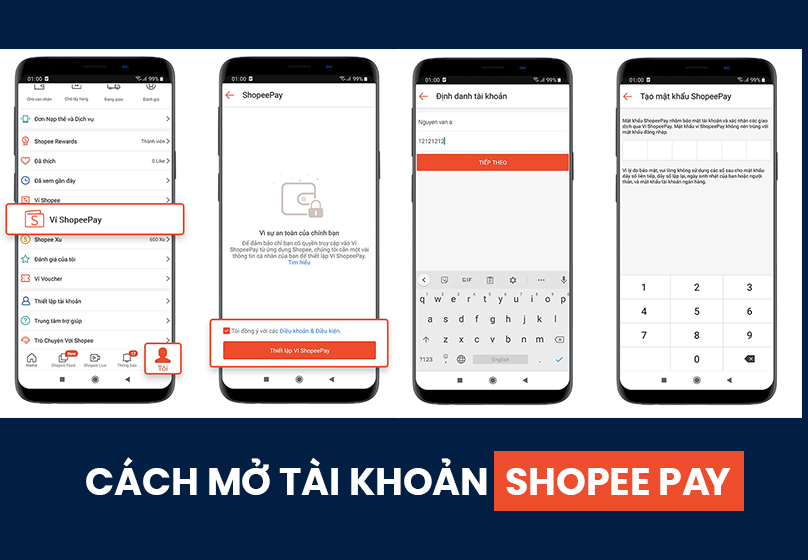
2. How to Register and Activate ShopeePay
To open and activate your ShopeePay wallet, follow these steps:
- Step 1: Open the Shopee app → select Me → ShopeePay Wallet → tap Open Wallet.
- Step 2: The system will request face verification. Position your face within the frame and hold steady for the scan.
- Step 3: Take photos of both sides of your ID card as instructed. Then review the displayed personal information and confirm.
- Step 4: Set up a 6-digit ShopeePay password to secure your account.
- Step 5: Link your bank account: choose your bank, enter the required details, and confirm with OTP to complete.
3. How to Link ShopeePay with Shopee
After activation, you need to sync the wallet with your Shopee account to use it for payments:
- Open the Shopee app → go to Me → ShopeePay Wallet.
- Tap Link Now and enter your ShopeePay password to complete the process.
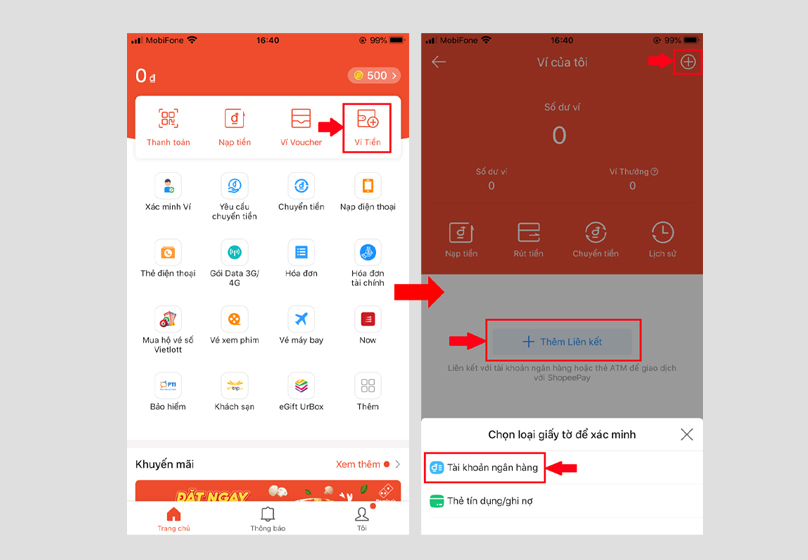
4. How to Link with a Bank Account
- Step 1: Select Add Bank Account → enter your ShopeePay password.
- Step 2: Choose your bank, then log in to your Internet Banking/Mobile Banking account.
- Step 3: Enter the verification OTP sent by the bank.
- Step 4: Complete the linking process.
5. How to Pay with ShopeePay
Once successfully linked, you can use ShopeePay to pay for any order on Shopee:
- Step 1: During checkout, select Payment Method.
- Step 2: Choose ShopeePay Wallet (pay with wallet balance or linked bank account).
- Step 3: Review your order details, then tap Place Order.
- Step 4: Enter your ShopeePay password and the OTP sent to your phone number to confirm the transaction.
Notes when using ShopeePay:
- Your wallet balance must always be ≥ the payment amount.
- If the system processes slowly, restart the Shopee app and check the order status.
V. Is ShopeePay Safe to Use?
One of the most important concerns for users when using an e-wallet is safety and security. With ShopeePay, you can rest assured since the system is built on advanced security technology:
- Compliance with PCI DSS international standard: a global payment data security certification widely applied to banks and financial institutions.
- Multiple security layers:
- A 6-digit ShopeePay password/PIN required for every transaction.
- OTP (One Time Password) sent to your phone to ensure account ownership.
- Biometric verification (face or fingerprint) to enhance security for login and payment.
- Real-time transaction monitoring: The system automatically detects unusual activities and provides instant alerts.
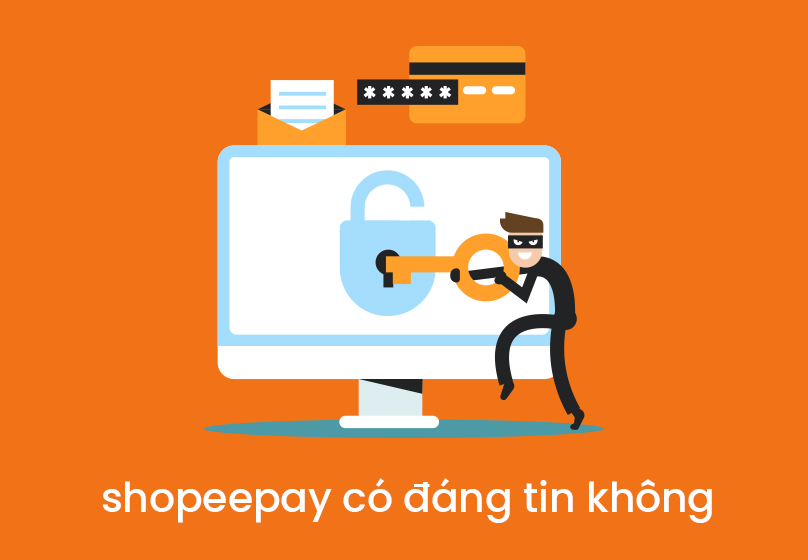
Important Notes
- Do not share your ShopeePay OTP or wallet password with anyone.
- Be cautious of fake messages or calls asking for personal information.
- Always double-check website addresses and links, and only log in through the official Shopee app.
VI. Conclusion
ShopeePay is an e-wallet designed to enhance the shopping and business experience for both buyers and sellers. For buyers, ShopeePay provides quick and convenient payments within seconds, strong security with multiple protection layers, and exclusive perks such as discount vouchers, free shipping, and cashback rewards. Meanwhile, for sellers, ShopeePay makes revenue management simpler, enables fast withdrawals, and ensures transparent reconciliation minimizing risks of loss.





































