
Loading Table of Contents...
Step-by-Step Guide to Creating a Shopee Store with SEO for Beginners
Quick Summary
Collapse
This article provides a detailed guide on how to create a Shopee store with SEO best practices, helping you improve visibility, reach more customers, and increase conversions effectively. Updated for 2025.
You have a business idea but don’t know where to start? You want to sell online but feel overwhelmed by all the platforms, tools, and scattered advice? Don’t worry, you’re not alone. Many others have faced the same challenge.
If you’re looking for a beginner-friendly, easy-to-use platform, Shopee is a great place to start. With a large user base and seller support system, Shopee allows you to create a store, list products, and reach customers from day one.
In this article, Connect Tech will walk you through the step-by-step process of creating a Shopee store, no complicated technical skills required, no upfront costs, and no more confusion about where to begin.
Why You Should Start a Shopee Store Now
Start Selling Easily Without Big Upfront Investment
Unlike building your own website or renting a physical store, Shopee lets you start an online business quickly and easily. All you need is an account, a few product images, and some basic information to begin selling. With its user-friendly interface, simplified process, and responsive seller support, Shopee is an ideal platform for those who are new to e-commerce.
Shopee Has Ready Buyers; You Just Need to Show Up
One of the biggest advantages of starting a Shopee store is the built-in customer base. Shoppers actively search for products every day, and with proper optimization, your items can appear right in front of them. Even without spending heavily on external ads, you still have a great chance of reaching potential buyers through a few simple steps.
A Platform That Fully Supports New Sellers
When you first open a store, Shopee provides helpful tips to guide you through filling in your shop details, uploading product photos, setting up shipping options, and participating in basic promotional programs.
You can also use tools like coin cashback, free shipping offers, and product boosting features to help drive your first few sales. You don’t need to be a marketing expert or know coding — Shopee gives you everything you need to create a professional and fully functioning store.
Are There Any Fees When Selling on Shopee?
Opening a Shopee Store is Completely Free
The first thing to know: Shopee does not charge you to create an account or open a store. You can list your products, update your store info, and start selling without paying any initial fees.
This free entry makes it easy to test your products and explore the market without financial pressure.
Transaction Fees Apply Only When You Make a Sale
Once you receive an order, Shopee deducts a small transaction fee from your revenue after the order is completed. There are no upfront payments or long-term commitments — you only pay when you make a sale. This flexible model helps you manage cash flow more effectively, especially in the early stages.
Additional Charges for Using Advanced Features
Beyond the basics, Shopee offers optional tools to improve your shop performance:
- Run ads to boost your products to top search results
- Offer discounts or freebies with orders
- Join promotional campaigns from the platform
These are not mandatory. You can decide to use them based on your business goals. Shopee only charges extra when you choose to activate these features.
Important Rules to Know Before Selling on Shopee
Before you create a Shopee store and start selling, it's essential to understand the platform’s policies to avoid violations that could disrupt your business.
List of Prohibited or Restricted Products
Not all products are allowed on Shopee. There are clear restrictions on items such as:
- Illegal or unethical goods
- Counterfeit or imitation products
- Drugs, hazardous substances, or harmful items
- Weapons, dangerous tools, or banned documents
Some categories like health supplements, cosmetics, or electronics may also require documentation to verify their origin.
Penalties for Policy Violations
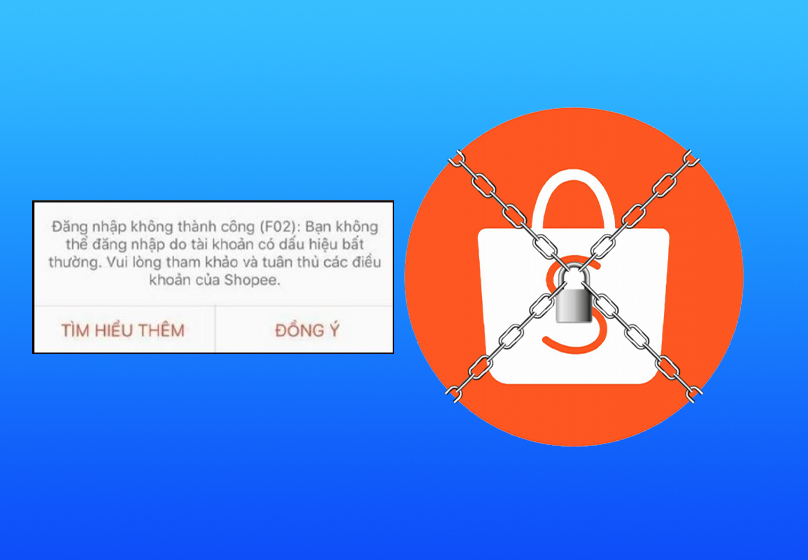
Shopee strictly monitors product listings. Violating policies may lead to actions such as:
- Product removal
- Reduced search visibility
- Temporary suspension or permanent ban of your store
These consequences can hurt both your revenue and reputation. That’s why staying compliant is vital for long-term success.
Protecting Your Account and Brand
Your account security is also important. Here are some tips:
- Never share your login or verification codes
- Enable two-step authentication for added protection
- Register your brand officially to prevent unauthorized use by others
Having a verified store with a unique brand identity builds trust with both Shopee and your customers.
Step-by-Step Instructions to Set Up Your Shopee Store
Ready to start selling? Here are the key steps to quickly set up your Shopee store, even if you have zero experience.
Step 1: Register a Shopee Account
Visit the Shopee website or download the mobile app. Choose the register option and fill in your basic info like phone number, email, and password. Once you receive the verification code, your account is ready.
Step 2: Set Up Your Store Profile
After logging in, go to Seller Center. Complete your store profile by adding:
- Store name
- Profile picture or logo
- A short description of your products or business type
Step 3: Add Your Pickup Address
This is the location where shipping partners will collect your products. Make sure the address is clear and accurate. You can add multiple addresses if you have several storage points.
Step 4: Choose Your Shipping Partners
Shopee supports various shipping companies. In the shipping settings, you can enable options like Giao Hang Nhanh, Giao Hang Tiet Kiem, or J&T. Each service has its strengths. Pick one based on your area or delivery preferences.
Step 5: Link Your Bank Account
This is how Shopee sends your earnings. Input your correct bank details, then verify your information via a security code sent to your phone.
Should You Hire a Shopee Store Design Service?
Many beginners choose to set up their Shopee stores on their own to cut costs. However, not everyone has the know-how to create appealing visuals, write optimized content, or apply SEO techniques effectively.
Benefits of Working with a Professional Agency
Agencies like Connect Tech and other e-commerce experts bring a wealth of experience. They not only help you create your Shopee store but also offer end-to-end support:
- Design attractive and consistent shop layouts
- Optimize product descriptions, titles, and store names with relevant keywords
- Manage smart Shopee ads to reduce costs and improve performance
- Advise on sales strategies and promotional planning
This saves you time, avoids common mistakes, and increases your visibility to customers more quickly.

When Should You Hire a Service?
Consider outsourcing if:
- You lack SEO, writing, or image editing skills
- You prefer to focus on sourcing and customer service
- You want to build a professional brand image right away
Conclusion
Creating a Shopee store is a simple first step, but successful selling requires thoughtful preparation. Investing in content, product images, SEO, and store setup can make a big difference.
Remember, SEO is not just about keywords. It's about presenting clear, helpful information that meets customer needs and creates a positive experience from browsing to checkout.
If you're not confident in the technical aspects or lack time to manage every detail, don’t hesitate to work with trusted partners like Connect Tech. We're here to help you grow your online business smoothly and sustainably.

Table of Contents



































