Loading Table of Contents...
What Is Website Structure? Why So Many SEO Websites Stay Messy for Years
Learn what website structure is, why many SEO websites stay messy for years, and how to build a clear, scalable SEO-friendly structure that ranks and converts.
Many websites have been doing SEO for years and still do not grow. Not because content is missing. Not because backlinks are weak. The real problem sits at the foundation. The website structure was messy from day one.
Website structure is not a decorative diagram. It defines how Google understands what the site is really about. It guides users on where to go next. When the structure is wrong, every SEO effort that follows is just patchwork.
In practice, the longer a website does SEO, the bigger and more chaotic it becomes. Pages stack on top of pages. Categories lose logic. Content competes with itself. Google cannot decide which page matters. Users get lost and leave. This article goes straight to the point. What website structure is, why so many SEO websites remain messy, and how to build a SEO-friendly website structure that scales without breaking itself.
I. What Is Website Structure?
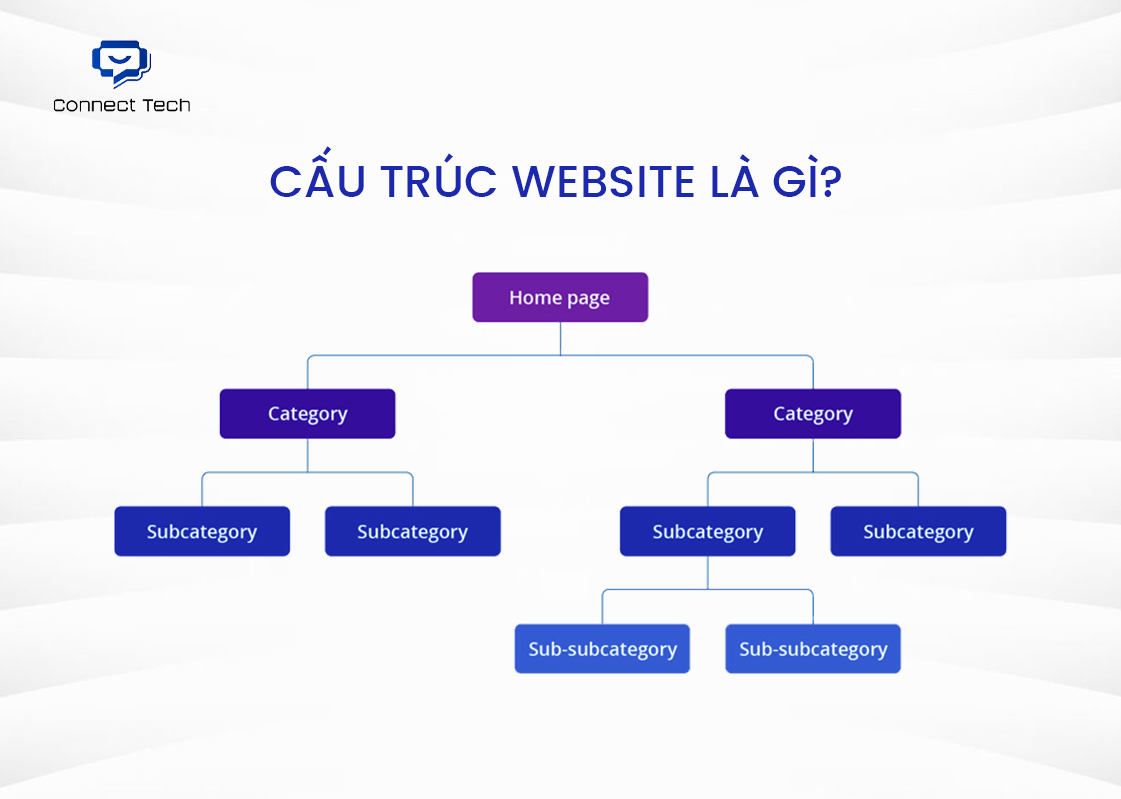
Website structure is how all pages are organized and connected. From the homepage to categories, articles, and products, everything follows a clear logical hierarchy.
Many people confuse website structure with website design. Design is what you see. Colors, layout, fonts. Structure is the internal skeleton. It defines page hierarchy and relationships.
A simple example for a sports shoe website:
- Homepage (Level 1)
- Men’s Shoes, Women’s Shoes, Kids’ Shoes (Level 2)
- Nike, Adidas, Puma (Level 3)
- Individual product pages (Level 4)
Each level is reachable within three clicks. Google crawls easily. Users find information fast. A good website structure must meet three conditions:
- Clear hierarchy
Which page is most important? Which pages belong together? The hierarchy must be logical. - Easy to crawl
Google bots should crawl the whole site within days, not get stuck in dead ends. - User-friendly
Visitors must know where they are and where to go next within three seconds.
That is why website structure matters far more than most teams realize.
II. The Role of Website Structure for SEO and Users
Website structure is not cosmetic. It directly affects rankings and revenue.
1. For Google
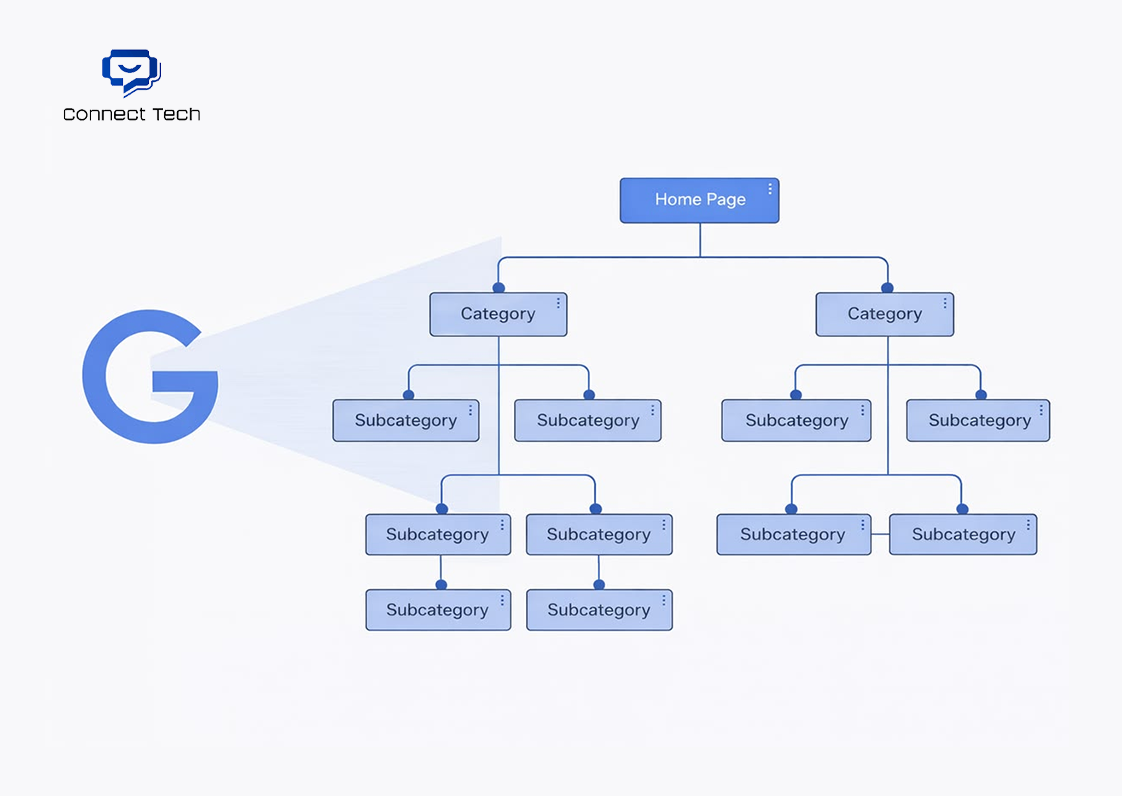
- Optimized crawl budget
Google limits how many pages it crawls per day. A messy structure wastes crawl budget on low-value pages. A clean structure guides bots straight to important pages. - Natural PageRank flow
The homepage holds the strongest authority. With proper structure, authority flows evenly to child pages. Important pages receive more internal links and more link equity. - Clear topical authority
When related content is grouped properly, Google understands your expertise. If all “running shoes” content lives in one cluster, topical authority becomes obvious. - Faster indexing
New pages linked from high-authority pages can be indexed in hours instead of weeks.
2. For Users
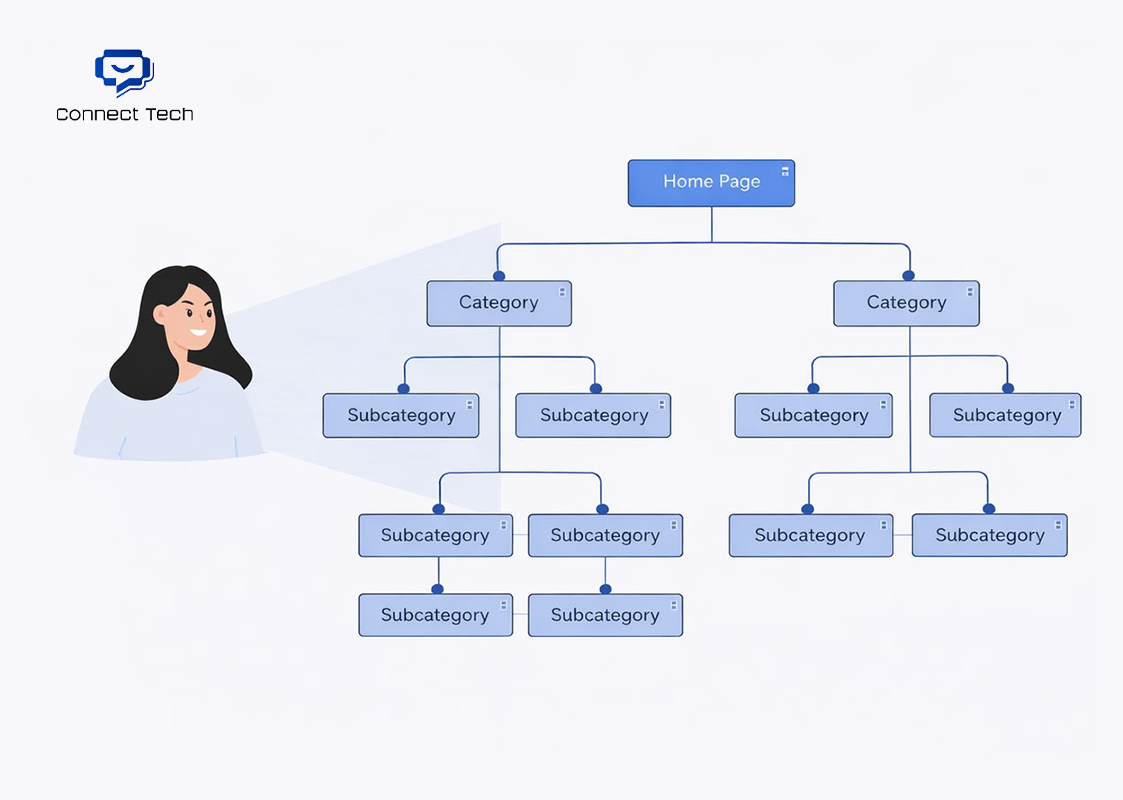
- Lower bounce rate
Visitors immediately know where to click. No confusion. No wandering. No quick exits. - Longer session duration
Clear navigation encourages exploration. Every click has a purpose. - Higher conversion rate
From landing page to checkout in two or three steps. Less friction means more sales.
This is not theory. One eCommerce site reduced its structure from five levels to three. Organic traffic increased by 40 percent in two months. No content changes. No new backlinks. Only website structure optimization.
III. Why Do So Many Websites End Up with a Messy Structure?
Most websites are not messy from the beginning. They become messy over time due to accumulated mistakes.
1. No plan from the start

Many teams build websites with a “launch first, fix later” mindset. Today they add page A. Next week they add category B. Next month they add section C. No one maps the full structure before building. The result is a website structure that grows like a tumor and eventually becomes uncontrollable.
2. Content added based on intuition
Content is written wherever it feels right. Any keyword with traffic looks tempting. No one checks which topic cluster a new article belongs to, which page it should support, or which level it sits on. After two years, the site has 500 articles scattered everywhere. Google no longer understands what the website truly specializes in.
3. Blindly copying competitors
Competitors have a category, so it gets copied. No one asks whether it fits the business model. No one checks if the competitor’s structure is even correct. In many cases, teams are copying a website that is already broken.
4. Design beauty overrides logic

Designers focus on visual appeal but do not understand SEO. Developers code exactly what the design shows without questioning the logic. The result is seven-level menus, overlapping categories, and chaotic URL structures. Website structure gets sacrificed just to “look nice.”
5. No one owns the structure
Marketing blames IT. IT blames the content team. The content team says they only write articles. No one takes responsibility for the overall website architecture. The website keeps growing, but no one redraws the map.
6. Fear of rebuilding
Many websites realize their structure is wrong, but are afraid to fix it. Afraid of losing traffic. Afraid of losing rankings. Afraid of the workload. So they keep patching and living with the mistake. The bigger the website gets, the harder it becomes to fix.
These six reasons explain why most business websites suffer from structural issues. Fixing early saves far more effort later.
IV. How to Build an SEO-Friendly Website Structure
Building a proper website structure is not complicated. It only requires discipline and step-by-step execution.
Step 1: Draw the hierarchy before doing anything else

Use paper or a mind map tool. Start from the top. Homepage at the peak. Below it are main categories, ideally no more than five to seven. Each category may have subcategories or landing pages. Only after that come articles or product pages.
Golden rule: no page should be more than three clicks away from the homepage.
Step 2: Apply the Silo Structure model
Group tightly related pages together. Each silo focuses on one major topic.
Example for a travel website:
- Silo 1: Northern Vietnam travel (Hanoi, Sapa, Ha Long, guides, food)
- Silo 2: Central Vietnam travel (Da Nang, Hoi An, Hue, beaches, history)
- Silo 3: Southern Vietnam travel (Saigon, Phu Quoc, Da Lat, package tours)
Pages within the same silo link heavily to each other. Links between silos are limited. Google clearly understands topical depth.
Step 3: Optimize URL structure
URLs must reflect hierarchy.
- Correct: domain.com/northern-vietnam-travel/sapa-travel-guide
- Wrong: domain.com/post12345 or domain.com/sapa-travel-guide
URLs should be short, keyword-focused, and clearly show category relationships.
Step 4: Build internal linking with intent
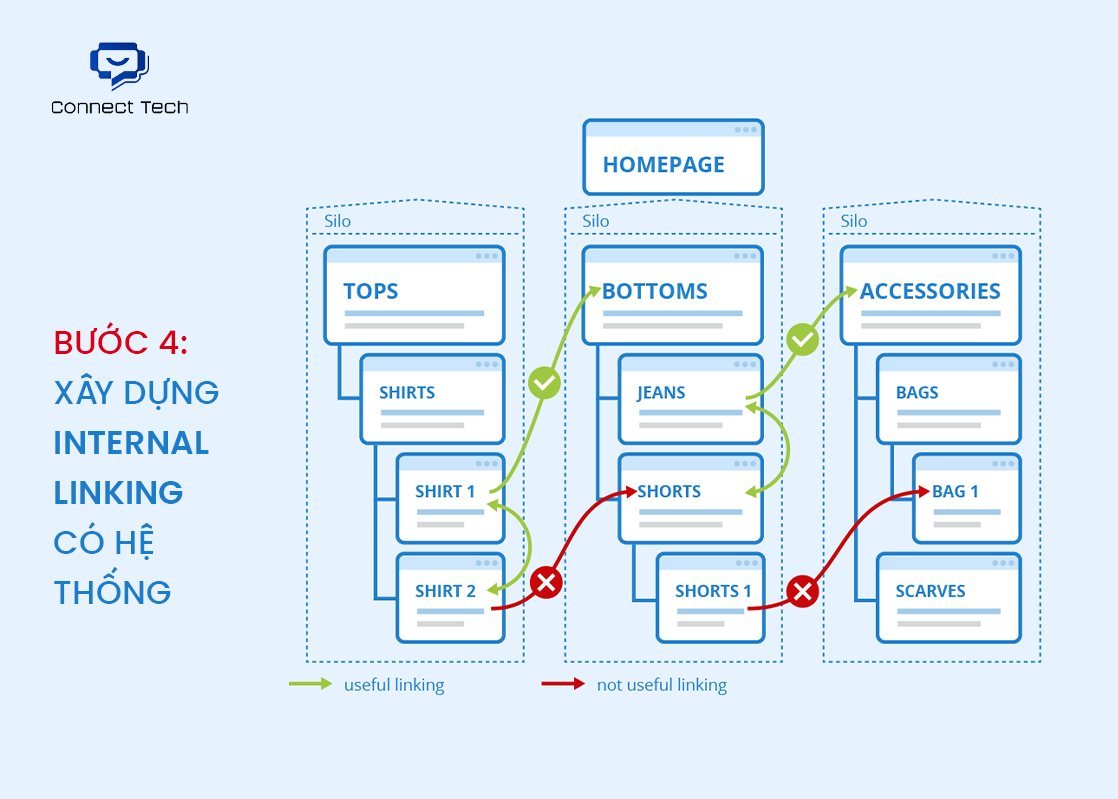
- Link top-down. Homepage links to main categories. Categories link to key subpages.
- Link horizontally. Related pages at the same level link to each other using relevant anchor text.
- Link bottom-up. Every child page should link back to its parent using breadcrumbs.
Avoid random links. Every link must serve a clear purpose.
Step 5: Create logical navigation
- Main menu should contain only the five to seven most important items.
- Dropdown depth should not exceed two levels.
- Footer menu supports secondary pages such as policy, contact, FAQ.
- Breadcrumbs are mandatory. Users know where they are. Google understands structure better.
Step 6: Prioritize important pages
Not all pages are equal. Pages meant to rank should receive priority.
- Closer to the homepage
- More internal links
- Links from high-authority pages
PageRank should be distributed intentionally.
Step 7: Remove thin pages and merge duplicates

- Audit the entire website. Pages with no value should be deleted or set to noindex. Two pages targeting the same intent should be merged.
- A lean website gets crawled faster and performs better.
Step 8: Create and submit an XML sitemap
- The sitemap shows Google the full website structure. Important pages should be prioritized.
- Submit it to Google Search Console and monitor index coverage weekly.
Step 9: Test real user experience
- Ask five to ten real users to find a specific tour or destination guide. Observe how they navigate.
- If they hesitate for more than ten seconds, the structure is not clear enough.
Step 10: Review and adjust regularly

- Every three to six months, review the structure. The website evolves. User intent changes. Competitors adapt.
- Website structure is not set and forget. It requires continuous care.
V. Conclusion
Website structure is not a secondary SEO task. It is the foundation that determines how far a website can grow.
A website can publish endless content and optimize every page perfectly. But when the website structure is messy, all efforts get diluted. Google struggles to understand. Users struggle to navigate. The website works against itself.
Is your website struggling with structural issues? Contact Connect Tech for a free website structure consultation and a clear roadmap to fix it properly.
Related Article:
Table of Contents
Related news

What Is a Landing Page? Key Differences Between a Landing Page and a Website
What is a landing page? Learn how landing pages work, where they appear, and the key differences between landing pages and websites for marketing success fast!

Website Design Technology: Which Platform Should Your Business Choose?
Explore website design technologies, compare platforms, key criteria, common mistakes, and choose the right solution to scale your business effectively today.

What Are Website and Web App? Detailed Distinction and How to Choose the Right One
Learn the key differences between a Website and Web App. Compare their functions and goals to choose the right digital solution for your business strategy now.

Pros and Cons of CMS Software: Should Businesses Use It for Their Website?
Explore the pros and cons of CMS software for business websites and decide whether CMS or custom development fits your long term growth strategy best today.

What Is Website Structure? Why So Many SEO Websites Stay Messy for Years
Learn what website structure is, why many SEO websites stay messy for years, and how to build a clear, scalable SEO-friendly structure that ranks and converts.
How Website Colors Influence User Emotions
How website colors shape user emotions, trust, and conversion. Learn common mistakes, color psychology, and how to choose colors that drive action growth now