
Loading Table of Contents...
What is TikTok Shop Balance? A–Z Guide to Understanding & Using
Quick Summary
Collapse
TikTok Shop Balance allows users to receive refunds quickly, conveniently and securely, while also enabling direct payments when shopping online on TikTok Shop
In recent years, TikTok Shop has emerged as a standout trend in online shopping. Not only does it offer convenience and a wide range of products, but the platform also allows users to browse entertaining videos while effortlessly placing orders, tracking shipments, and receiving packages, all in just a few taps.
However, refund-related issues remain a common concern for many customers, and that’s where the term “TikTok Shop Balance” often sparks curiosity. So, what exactly is TikTok Shop Balance? How does it work, what are its benefits, and what should you keep in mind? This article will walk you through everything you need to know from A to Z, so you can make the most of TikTok Shop Balance during your shopping experience.
I. What Is TikTok Shop Balance?
TikTok Shop Balance refers to the amount credited to your account when a refund request for a TikTok Shop order is approved. Instead of returning the money directly to your bank account or e-wallet, this method allows users to receive funds quickly and use them instantly within the app.
Essentially, TikTok Shop Balance functions like TikTok’s own digital wallet. It enables buyers to use their balance to pay for other products on TikTok Shop. This makes the entire process—from refunds to new purchases—smooth, secure, and fully integrated within the platform, eliminating the need for third-party services.
Key Features of TikTok Shop Balance
- Fast Refund Processing: In some cases, refunds are processed within minutes, while others may take between 3 to 7 business days depending on the situation.
- Non-Withdrawable Funds: The balance cannot be transferred to a bank account or e-wallet. It can only be used to make purchases on TikTok Shop.
- No Expiration Date: According to current policy, TikTok Shop Balance does not expire. Users can choose to spend it immediately or save it for future purchases.
Clearly, TikTok Shop Balance serves as a convenient payment solution—especially ideal for frequent TikTok Shop users who want to streamline their refund experience and manage spending more effectively.
II. How to Receive Refunds via TikTok Shop Balance
When an issue arises with your TikTok Shop order and you request a refund, TikTok allows users to choose TikTok Shop Balance as the refund method. This is a fast and convenient way to ensure the refunded amount is credited directly to your shopping account.
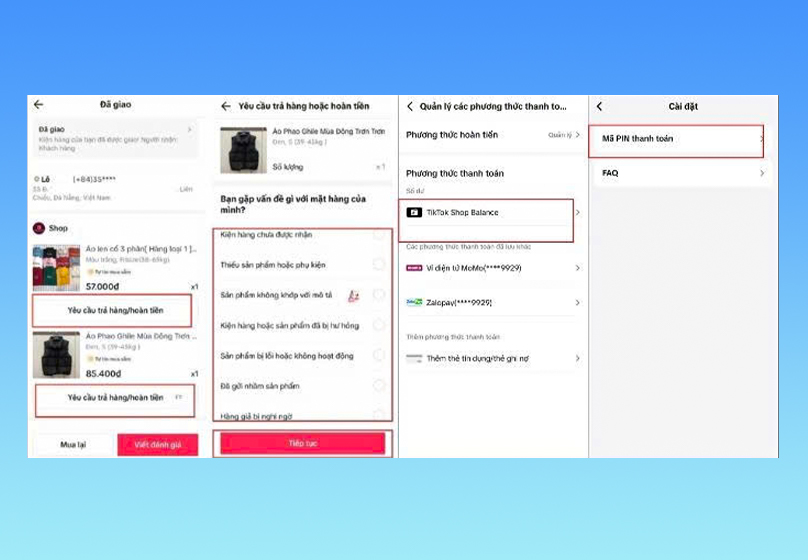
Basic steps to receive a refund:
- Step 1: Go to your Orders → Select the order you want to refund → Tap Request Refund
- Step 2: Choose TikTok Shop Balance as your refund method
- Step 3: Set up or enter your payment PIN to verify the request
- Step 4: Submit the request → Wait for TikTok to review and approve
Once approved, the refunded amount will be added to your TikTok Shop Balance.
Refund Processing Time
- In most cases, the refund is credited within minutes if the transaction is processed quickly.
- For cases requiring further review, the process may take 3 to 7 business days.
Important Notes
- If you haven’t received your refund after 7 business days, it’s recommended to contact TikTok’s support team to file a complaint.
- Make sure you’ve set up your payment PIN to ensure the refund process goes smoothly.
Read more: How to Increase TikTok Followers Quickly and Effectively in 2025
III. How to Use & Check Your TikTok Shop Balance
Once your refund has been credited to your TikTok Shop Balance, you can easily use it for future purchases.
1. How to Use TikTok Shop Balance at Checkout
- At the payment step, select TikTok Shop Balance as your primary payment method.
- If your balance is less than the total order amount, the system will allow you to combine it with a bank card or e-wallet to cover the remaining cost.
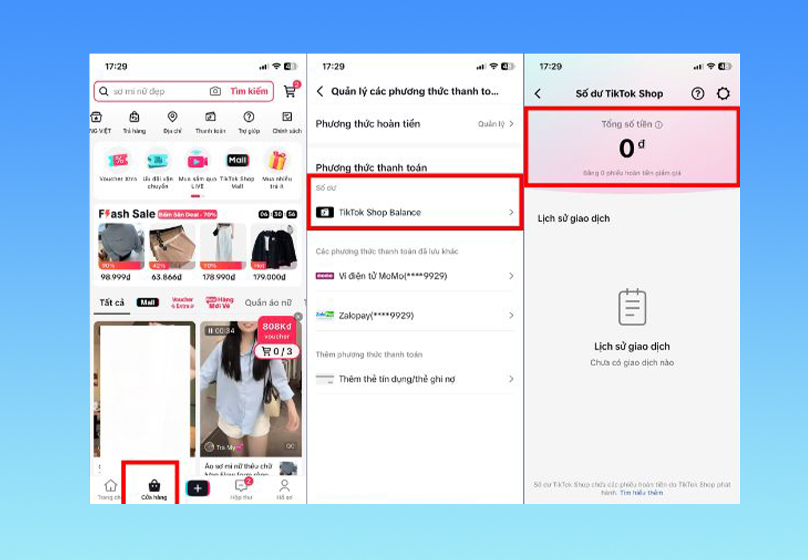
2. How to Check Your TikTok Shop Balance
- Go to: Shop → Payment → TikTok Shop Balance Here, you can view your current balance along with a detailed transaction history, including refunds and purchases made using your balance.
Refunds When Paying with TikTok Shop Balance
- If you make a purchase using TikTok Shop Balance and later request a return, the refunded amount will automatically be credited back to your TikTok Shop Balance once TikTok approves the request.
IV. Benefits of Using TikTok Shop Balance
TikTok Shop Balance isn’t just a refund method—it offers several advantages that enhance your shopping experience on the platform.
1. Fast and Convenient Refunds
Instead of waiting for banks or e-wallets to process your refund, the money can be returned to your TikTok Shop Balance within minutes. This allows you to continue shopping without interruption.
2. Seamless In-App Usage
No need to transfer funds to another platform. With just a few taps, you can use your balance to pay for new orders directly within TikTok Shop.
3. No Expiration Worries
According to current policy, your TikTok Shop Balance doesn’t expire. You can spend it right away or save it for future purchases—giving you full flexibility over your spending.
4. Security & Protection
Every time you use TikTok Shop Balance, the system requires you to enter your payment PIN for verification. This ensures secure transactions and helps minimize risks when shopping online.
5. Enhanced Shopping Experience
TikTok Shop Balance is designed to keep users engaged in the shopping journey on TikTok. With available funds in your balance, you can easily place additional orders, creating a smoother and more convenient shopping experience.
V. Important Notes When Using TikTok Shop Balance
While TikTok Shop Balance offers many benefits, users should keep the following points in mind to avoid confusion or losing entitlements:
1. Cannot Be Withdrawn to Bank or E-Wallet
The balance in TikTok Shop can only be used for purchases within TikTok Shop. Currently, TikTok does not support withdrawing funds to bank accounts or e-wallets (such as ZaloPay, Momo, etc.).
2. Cannot Be Transferred to Another Account
TikTok Shop Balance is tied to your personal TikTok account and cannot be transferred to another user. Therefore, it’s important to carefully consider this refund method before selecting it.
3. Check Regularly to Avoid Missing Refunds
During your shopping journey, you might receive a refund but forget to check your balance. To stay updated, regularly visit: Shop → Payment → TikTok Shop Balance to ensure you don’t miss any eligible refunds.
4. Policies May Change
TikTok frequently updates its terms and policies. To stay informed and use your balance correctly, make sure to follow official announcements from TikTok Shop.
VI. Conclusion
TikTok Shop Balance is a fast, convenient, and secure tool for receiving refunds directly within the TikTok platform. Functioning like a built-in digital wallet, it allows users to shop confidently without interruptions or missing out on refund credits.
If you're looking to unlock the full potential of TikTok Shop, let Connect Tech be your trusted partner with professional TikTok services ranging from creative content and trend-driven videos to optimized advertising strategies.

Table of Contents



































