
Loading Table of Contents...
How To Register And Start Selling On TikTok Shop For Beginners: Step-By-Step Guide
Quick Summary
Collapse
Learn how to sell on TikTok effectively with this step-by-step guide: from registering, uploading products, creating engaging videos to boosting conversions fast.
TikTok is no longer just an entertainment platform. Now it is an effective sales channel for everyone, from young entrepreneurs to experienced online shop owners. If you are wondering how to sell on TikTok or where to begin, this guide will walk you through every step – from setting up your TikTok Shop account to optimizing your content, products, and increasing your sales effectively.
What Is TikTok Shop And Why Sell On TikTok?
What is TikTok Shop?
TikTok Shop is an e-commerce feature built into the TikTok app. It allows sellers to upload products and lets buyers make purchases directly while watching videos. This is a social commerce platform that combines content and shopping in one place.
Why you should sell on TikTok Shop:
- Young and highly interactive customer base that tends to buy based on emotion.
- Short videos are easy to go viral, helping products reach users organically.
- No need for a website or complicated tech skills.
- Support for new sellers with promotions and beginner-friendly programs.
Who should sell on TikTok Shop?
- Newcomers who want to try selling online.
- Small shops without large budgets to join big e-commerce platforms.
- Content creators who want to monetize by selling.
- Businesses are looking to expand their reach to new customers.
Step-by-Step Guide To Selling On TikTok Shop For Beginners
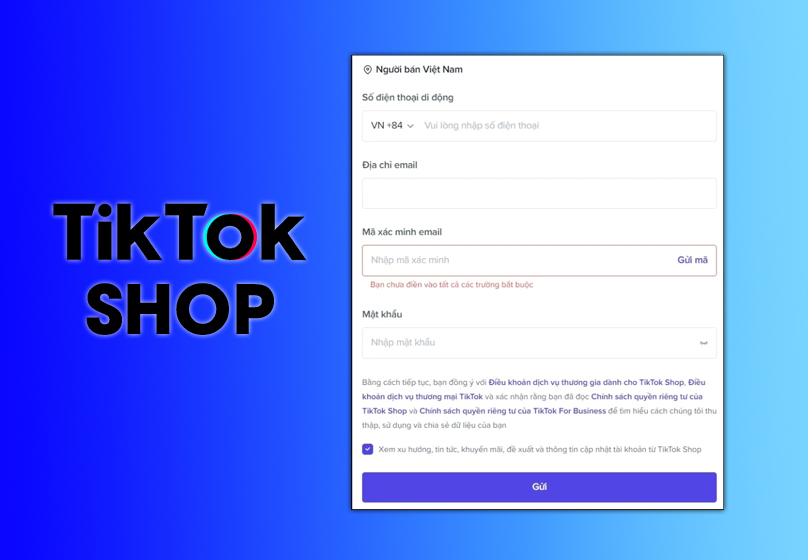
Step 1: Create a TikTok and TikTok Shop account
- Go to the official website: https://seller-vn.tiktok.com
- Log in with your personal TikTok account or create a new one
- Choose account type: individual or business
- Fill in all contact details, address, and payment bank account
- Verify your ID or business license if applicable
Note: Your shop name should match or relate to your TikTok account to build trust.
Step 2: Choose the right products to sell
Focus on products that are easy to showcase in videos, reasonably priced, and trending among young users.
Popular product ideas for 2025:
- Skincare and mini makeup items
- Trendy fashion accessories (hair clips, necklaces, fabric bags)
- Room decor, night lights, useful gadgets
- Smart home products, kids toys
Avoid selling:
- Products with unclear origin
- Counterfeit or brand knock-offs
- Supplements without certification or approval
Step 3: Upload your product to TikTok Shop
Prepare the following details:
- Detailed product title with relevant keywords
- Clear and friendly product description that follows SEO best practices
- Images (minimum 1000x1000px), at least 3 high-quality photos
- A short product video (15–45 seconds) focusing on benefits for users
Writing an effective product description:
- Use simple and relatable language focusing on the buyer’s needs
- Use bullet points for easy readability if needed
- Include keywords such as "sell on TikTok Shop" or "how to sell on TikTok"
Step 4: Record engaging product videos
- Step 1: Write a quick script with three parts: hook – intro – call to action
- Step 2: Choose a bright setup with clear background
- Step 3: Use your phone to record as long as it’s stable and sharp
- Step 4: Add trending music and simple but catchy effects
- Step 5: Focus on showing real value instead of just talking about features

Step 5: Write captions and add hashtags properly
A good caption includes:
- Why the viewer should buy
- What value the product brings
- Clear CTA like "Click the link to buy now!" or "Sale today only!"
Suggested hashtags:
- By category: #authenticbeauty #kidsfashion #smartgadgets
- By platform: #TikTokShop #sellonTikTok #productreview
Tip: Do not use more than 10 hashtags. Choose the most relevant ones.
Step 6: Boost interaction and reach your target customers
- Reply to comments quickly to keep your content active
- Livestream with a fixed schedule each week to build viewer habits
- Add TikTok Shop link in your bio and under each video
- Use pinned comments to guide viewers to your product
- Run ads if you have a budget to expand reach

Do You Have To Pay Fees To Sell On TikTok Shop?
Does TikTok Shop charge sellers?
Yes. Just like other online marketplaces, TikTok Shop charges a small fee for every successful order.
Main fees include:
- Platform commission: 1% – 5% depending on category and campaign
- Payment processing fee: Around 1.5% – 2% of total order value
- Fulfillment fee (if any): Applied if you use TikTok or third-party fulfillment services for storage, packing, and delivery
When are fees charged?
- TikTok only charges when an order is successfully delivered and not returned
- You are not charged for cancelled orders or returns due to platform issues
Tips To Sell Successfully On TikTok Shop
Post regularly each day at peak times
- Set a daily posting schedule during high activity times such as 11:30 am, 7 pm, or 9:30 pm
- This helps the algorithm and your followers expect consistent content
- Take advantage of sales campaigns or holiday seasons to increase conversion

Use TikTok Ads at the right time to boost reach
- You do not need a big budget, just choose the right timing like product launches or flash sales
- Prefer in-feed video ads that blend naturally into users’ feeds
- Track performance and adjust content, CTA, or budget as needed
Link your TikTok Shop to other platforms
- Add product links to your Instagram, Facebook, or Zalo bio
- Repost your TikTok videos to other channels for extra exposure
- Create a mini landing page to gather all your products and guide viewers smoothly

Work with KOLs or micro influencers in your niche
- You do not need big celebrities. Choose people who influence your specific audience
- Micro influencers often have smaller but more loyal and engaged communities
- Be clear about the message, usage rights, and how they link to your shop in the post
Common Mistakes Beginners Make When Selling On TikTok Shop
Not completing TikTok Shop account verification
- Some sellers skip the ID verification step or input incorrect information
- This causes delays, limited features, or payment issues
- Always fill in all required fields and use valid documents
Poor product videos with no clear value
- Many videos just show the product without explaining how it works or its benefits
- Viewers cannot understand why they need the item, so they scroll away
- Build a simple but focused video that explains what the product solves
Exaggerated descriptions or misleading words
- Some sellers overpromise in product descriptions to get more sales
- This can lead to content being rejected or even warnings from TikTok
- Be honest, give real examples, and show the actual product features
Ignoring comments or responding too late
- If you do not respond to viewer comments, TikTok sees the post as low engagement
- This reduces your chance to be featured and lowers conversions
- Try to reply quickly and sincerely to build trust and maintain reach
Conclusion
TikTok Shop offers a great opportunity for anyone looking to start an online business without high upfront costs. But to succeed, you need to understand the process, optimize your products, and post content consistently.
If you still feel unsure or do not know where to begin, Connect Tech is here to support you. We offer full TikTok Shop setup services, content production, account management, and ad campaigns to help you reach the right customers.
Contact us today for a free consultation and receive special offers when you start selling with TikTok Shop.

Table of Contents



































