Loading Table of Contents...
How to Log In to Lazada Seller Center Easily for Newbies
Log in to Lazada Seller Center quickly and securely to help you manage your store effectively, track orders, update products and handle problems easily.
Lazada is one of the largest e-commerce platforms, attracting a large number of buyers and sellers. To help sellers effectively manage their stores, Lazada provides Lazada Seller Center, a centralized management platform where you can upload products, update prices, track orders, and care for customers—all with just a few simple steps.
This article will guide you on how to log into Lazada Seller Center quickly, securely, and how to troubleshoot common issues, helping you manage your store efficiently right from the start.
I. What is Lazada Seller Center?
Lazada Seller Center is an online store management platform provided by Lazada exclusively for sellers. It is where you can perform all essential operations to effectively run your business on Lazada.
Through Lazada Seller Center, you can:
- Post and manage products: Add new, edit, update product information and images.
- Track orders: View detailed status of each order from placement to delivery completion.
- Manage inventory & pricing: Adjust product quantities and prices in line with your business strategy.
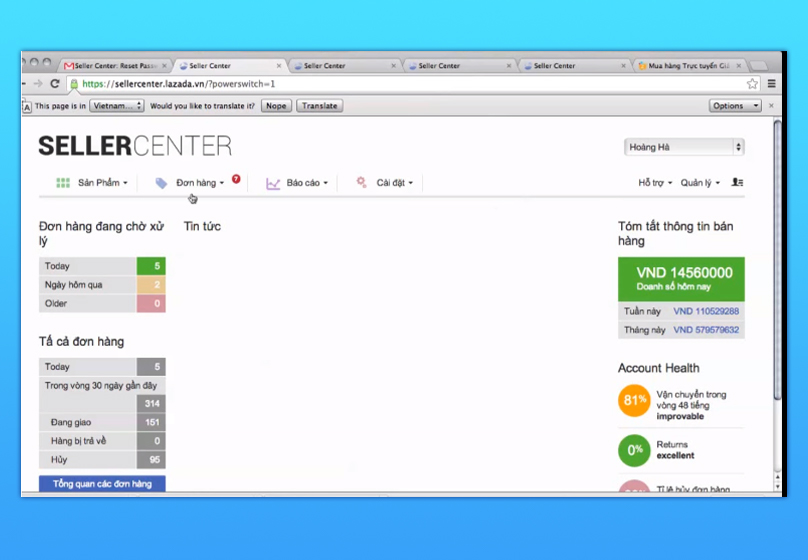
- Analyze business performance: Access reports on revenue, conversion rates, and product performance.
- Customer service: Respond to messages, handle complaints, and build store reputation.
The strength of Lazada Seller Center lies in having all features concentrated in a single, easy-to-use interface, supporting both web and mobile app versions. This enables sellers to manage their stores anytime, anywhere with just a few simple actions.
II. How to Log Into Lazada Seller Center
2.1. Login Instructions for Existing Account Holders
Step 1: Visit the Lazada Seller Center login page.
Step 2: Enter the email or phone number you used to register.
Step 3: Enter your password and click Login.
Step 4: If prompted, enter the OTP code sent via SMS or email to complete security verification.
x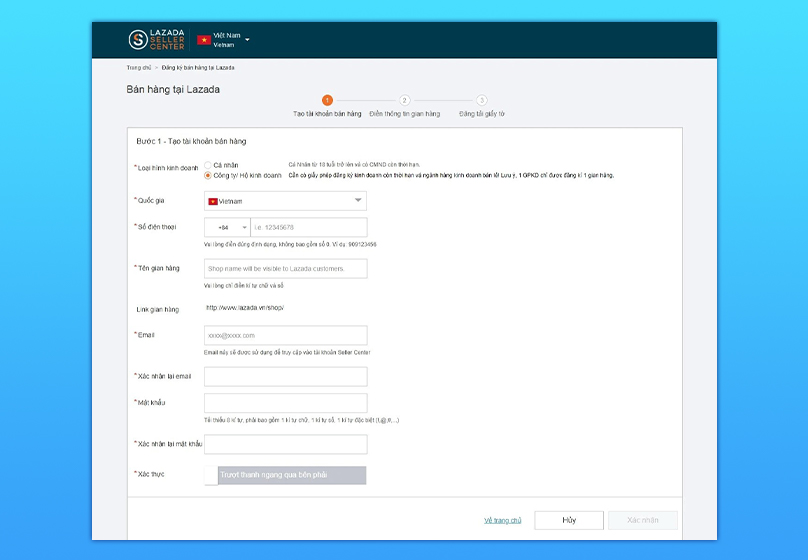
2.2. How to Create a New Account for New Sellers
If you have never sold on Lazada before, you need to create an account before logging in:
Step 1: Access Lazada Seller Center and select Register.
Step 2: Choose your business type:
- Individual: Suitable for small sellers or family businesses.
- Enterprise: Suitable for companies or organizations.
Step 3: Fill in basic information:
- Phone number or email
- Login password
- Store name (Shop)
- Warehouse address & contact information
Step 4: Agree to the terms and conditions, then click Register.
Step 5: Log in to Lazada Seller Center with your registered email or phone number and password to start managing your store.
Read more: Instructions for creating Shopee seller channel from A to Z

III. Troubleshooting Login Issues on Lazada Seller Center
During login, sellers may occasionally face interruptions caused by forgotten passwords, incorrect login details, internet or browser issues, locked accounts due to policy violations, or OTP delivery problems. Below are common issues and how to resolve them:
Forgot Lazada Seller Center Password:
Access Lazada Seller Center → Click “Forgot Password?” → Re-enter registered email or phone → Confirm with OTP → Reset password.
Login Information:
- Check keyboard language (Vietnamese/English).
- Ensure Caps Lock is off.
- Re-enter carefully to avoid typos.
Account Locked:
Contact Lazada Support via the Help section on Seller Center → Provide verification documents and reason for unlocking request → Wait for Lazada’s response and resolution.

Did Not Receive OTP:
- Check Spam/Junk folder if using email.
- Check mobile signal, toggle airplane mode on/off.
- Request OTP resend after about 30 seconds.
Connection or Browser Errors:
- Restart Wi-Fi or 4G connection.
- Try logging in using different browsers like Chrome or Firefox.
- Clear browser cache and cookies.
IV. Logging into Seller Center via Mobile App for New Sellers
Besides using web browsers, sellers can manage their Lazada stores anytime, anywhere through the Lazada Seller Center mobile app. The app facilitates order processing, revenue tracking, and quick product updates with just a few taps.
4.1. Login Instructions for Existing Account Holders
Steps to login:
Step 1: Download Lazada Seller Center app
- Android: Download from Google Play
- iOS: Download from App Store
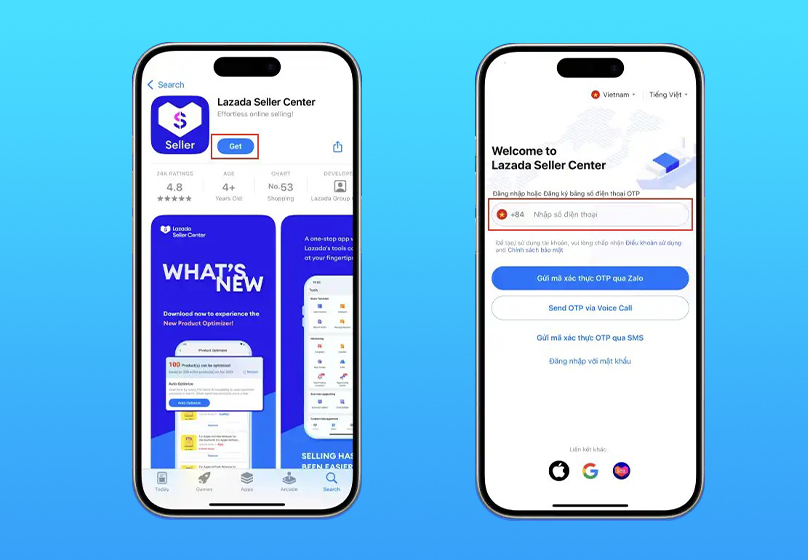
Step 2: Open the app and select “Login”
- Enter registered email/phone and password
- Or choose quick login with linked Google or Facebook accounts
- Security verification (if any): Enter OTP sent to phone/email to complete login
4.2. How to Create a New Account for New Sellers
If you are a new seller and have never registered, create an account directly on the app:
- Open Lazada Seller Center app → Select “Register”
- Choose business type: Individual or Enterprise
Step 1: Enter registration details:
- Phone number or email
- Store name
- Password
Step 2: Verify phone/email with OTP
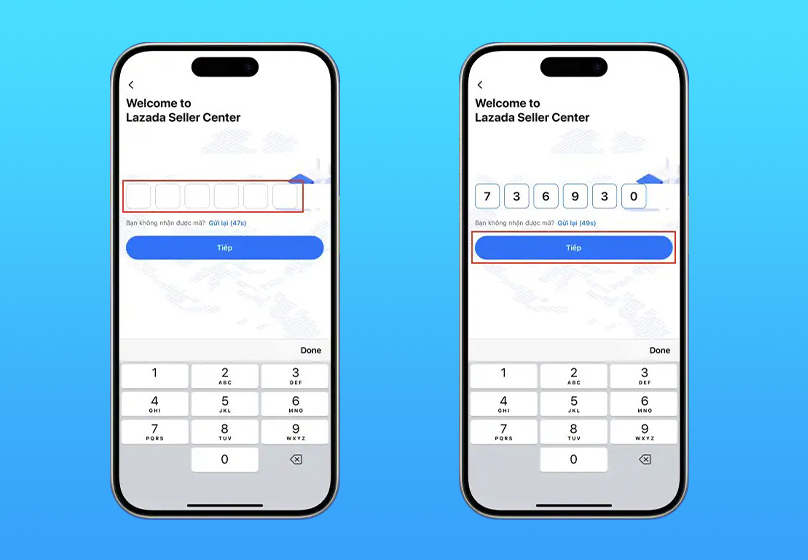
Step 3: Complete store information (address, ID or business license)
Step 4: Tap “Complete” to activate account
Step 5: Log in to Lazada Seller Center with the registered email/phone and password to start managing your store.
V. Tips for Managing Your Account After Logging In to Lazada Seller Center
5.1. Adjust and update your store information fully
Right after logging in, check and update key details such as shop name, logo, banner, store description, and sales policies. A well-presented store builds customer trust and helps your products appear more prominently in Lazada’s search results.
5.2. Manage products
Arrange products into appropriate categories and frequently update stock levels to make it easier for customers to find what you sell. Also, optimize product titles, descriptions, and images to increase click rates and purchase conversion.
5.3. Maintain account security
Protect your login information to avoid losing control of your store. Use strong passwords, change them regularly, and enable two-factor authentication (2FA). Do not share your account and only log in from trusted devices and networks.
5.4. Respond promptly and effectively to customers
Quickly reply to messages and handle complaints to retain customers and improve shop ratings. Provide clear product information, support customers wholeheartedly, and create a positive shopping experience to boost repeat purchases.
5.5. Monitor sales performance
Regularly check reports on Lazada Seller Center to keep track of your business status. Focus on key metrics like revenue, conversion rate, order volume, and best-selling products. Use this data to adjust pricing, improve product content, and plan promotions effectively.

VI. Conclusion
Mastering login steps, troubleshooting common issues, and applying smart management tips will help you operate your Lazada business more smoothly and proactively. If you don’t have an account yet, register now to start building your store and take full advantage of opportunities from this leading e-commerce platform.
To enhance your business effectiveness, you can also choose Lazada services from Connect Tech, which supports you comprehensively—from account creation, store optimization to managing and growing your Lazada business efficiently.
Table of Contents
Related news

What Is a Landing Page? Key Differences Between a Landing Page and a Website
What is a landing page? Learn how landing pages work, where they appear, and the key differences between landing pages and websites for marketing success fast!

Website Design Technology: Which Platform Should Your Business Choose?
Explore website design technologies, compare platforms, key criteria, common mistakes, and choose the right solution to scale your business effectively today.
What Are Website and Web App? Detailed Distinction and How to Choose the Right One
Learn the key differences between a Website and Web App. Compare their functions and goals to choose the right digital solution for your business strategy now.
Pros and Cons of CMS Software: Should Businesses Use It for Their Website?
Explore the pros and cons of CMS software for business websites and decide whether CMS or custom development fits your long term growth strategy best today.

What Is Website Structure? Why So Many SEO Websites Stay Messy for Years
Learn what website structure is, why many SEO websites stay messy for years, and how to build a clear, scalable SEO-friendly structure that ranks and converts.
How Website Colors Influence User Emotions
How website colors shape user emotions, trust, and conversion. Learn common mistakes, color psychology, and how to choose colors that drive action growth now