
Loading Table of Contents...
How to Download TikTok Videos Without Logo Fastest and Easiest 2025
Quick Summary
Collapse
A roundup of methods to download TikTok videos without watermarks, detailed guidance using SnapTik, plus other helpful tools and apps, along with important tips
TikTok is currently an extremely popular short video platform where users share and create content daily. The demand to download TikTok videos for storage or sharing is also steadily increasing. However, videos downloaded directly from TikTok usually come with a watermark (logo and username), which can be inconvenient when rewatching or repurposing the content. Therefore, in this article, we’ll explore the fastest, simplest, and safest ways to download TikTok videos without watermarks in 2025.
I. What does downloading TikTok videos without watermarks mean?
Downloading TikTok videos without watermarks refers to saving videos from the TikTok platform to a personal device while removing the default watermark (TikTok logo and username).

Purpose of downloading videos without watermarks:
- Offline viewing: Users can rewatch videos anytime without needing an internet connection.
- Creative inspiration: Helps with learning content ideas, video editing techniques, music choices, or trending formats.
Important note:
Videos should only be downloaded for personal use. If you plan to share or repost them on another platform, you must credit the original source and respect the creator’s copyright and effort.
II. Popular Methods to Download TikTok Videos Without Watermarks
Currently, there are several ways to download TikTok videos without watermarks, suitable for both computers and smartphones. Some commonly used methods include:
1. Downloading via online websites
This is the simplest and most popular method, requiring no app installation. You just need to copy the TikTok video link and paste it into a download website. After a few seconds, the video can be saved to your device. Trusted options include:
- SnapTik: User-friendly interface, fast download speed, works well on both mobile and desktop.
- SSSTik: In addition to watermark-free downloads, it also supports extracting MP3 audio from videos.
- TikMate: Allows you to choose from multiple video quality options (SD, HD, Full HD), ideal for large video files.
- SnapAny: A standout feature is its support for both international TikTok and Douyin (the Chinese version of TikTok).

2. Downloading videos via mobile apps
If you frequently download videos, you can install dedicated apps such as:
- SaveTik – Available on both Android and iOS, saves videos directly to your gallery.
- Downloader for TikTok – Lightweight and easy to use, ideal for users who download multiple videos regularly.
3. Using Shortcuts on iPhone
iOS users can take advantage of pre-shared Shortcuts. This method is safe, doesn’t require installing third-party apps, and offers quick, convenient operation.
Read more: How to Increase TikTok Followers Quickly and Effectively in 2025
III. Step-by-Step Guide to Download TikTok Videos Using SnapTik
Among the tools for downloading TikTok videos without watermarks, SnapTik is one of the most popular thanks to its simplicity, fast speed, and stable performance across various devices. You don’t need to install any additional apps or log into your TikTok account—just a video link is enough to start downloading.
Steps to download TikTok videos using SnapTik:
Step 1: Copy the TikTok video link
- Open the TikTok app on your phone or use a browser on your computer.
- Select the video you want to download.
- Tap the Share button, then choose Copy Link.

Step 2: Go to the SnapTik website to continue
Open a web browser (Chrome, Safari, Cốc Cốc, Edge, etc.). Visit the site: https://snaptik.app.
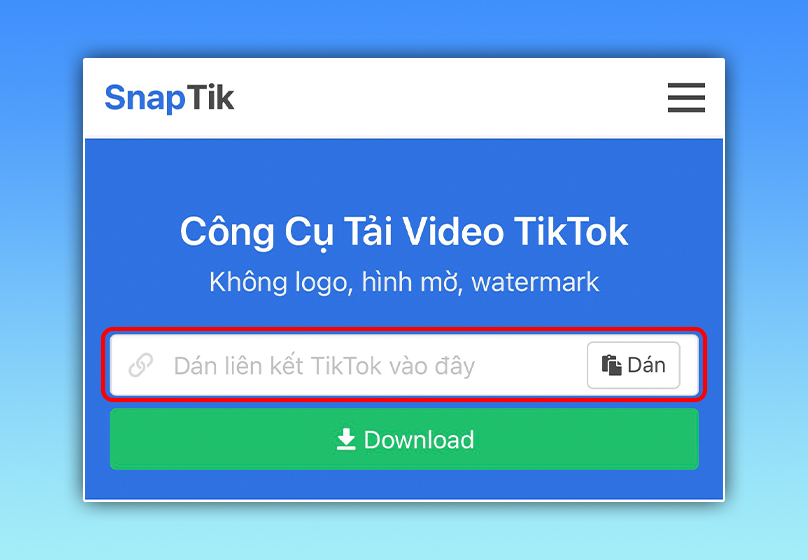
Step 3: Paste the TikTok video link into the input box
On SnapTik’s main interface, you’ll see an empty field. Paste the video link you just copied into this box. Click Download to begin the video download process.
Step 4: Choose the video format to download
Download options will appear after a few seconds. You can choose from:
- Download Video: Standard quality with smaller file size.
- Download Video HD: High-definition quality with sharper visuals.

Step 5: Save the video to your device
- On mobile devices: The video will be saved directly to your gallery.
- On computers: The video will automatically download to the “Downloads” folder.
IV. Other Tools and Apps for Downloading TikTok Videos Without Watermarks
Besides SnapTik, you can explore various other tools and apps to download TikTok videos without watermarks. Each option has its own strengths, catering to different user needs.
1. SSSTik.io
- Function: Allows downloading TikTok videos without watermarks and extracting MP3 audio files.
- Pros: Simple interface, fast download speed, works on both desktop and mobile.
- Cons: Contains ads and requires a stable internet connection for smooth downloads.
2. TikMate
- Function: Downloads high-quality TikTok videos, including large file sizes.
- Pros: Offers multiple quality options (SD, HD, Full HD).
- Cons: May experience slower download speeds when selecting high-resolution videos.
3. SnapAny
- Function: Supports downloading videos from both international TikTok and Douyin (Chinese TikTok).
- Pros: Ideal for users interested in exploring video trends from the Chinese market.
- Cons: Interface is slightly more complex and less user-friendly compared to SnapTik or SSSTik.
4. SaveTik (Mobile App)
- Platform: Available for both Android and iOS.
- Pros: Saves watermark-free videos directly to your phone’s gallery; simple to use.
- Cons: Requires app installation and takes up device storage.
5. Downloader for TikTok (Android App)
- Platform: Android only.
- Pros: Lightweight, fast download speed, supports downloading multiple videos in succession.
- Cons: Only works on Android; no iOS version available.
6. Shortcuts on iPhone
- Function: iOS users can set up shortcuts to download videos directly.
- Pros: Safe, no need for third-party apps, quick and convenient operation.
- Cons: Requires initial setup; best suited for users familiar with iPhone Shortcuts.
V. Important Notes When Using Downloaded TikTok Videos Without Watermarks
Downloading TikTok videos without watermarks makes it easier to save and reference content, but it’s essential to follow key guidelines to respect copyright and keep your device safe.
1. Regarding Content Copyright
- All videos on TikTok are the intellectual property of the original creators. If you intend to re-upload them to other platforms, you must clearly credit the source or the creator.
- Do not edit, crop, or alter the content in ways that could misrepresent or harm the creator’s image or reputation.
- Using videos responsibly helps you avoid violating laws and platform policies.
2. Regarding Safety and Security
- Never log into your TikTok account on unfamiliar websites or apps. Trusted tools only require a public video link and will never ask for your password.
- Only use reputable tools or apps with high traffic, positive reviews, and clear privacy policies.
- Avoid downloading software from unknown sources, as they may contain malware, viruses, or spyware that could compromise your personal data.
VI. Conclusion
Downloading TikTok videos without watermarks offers many benefits, making it easier for users to store content for offline viewing or draw creative inspiration.
Today, there are various methods available—using websites, mobile apps, or iPhone Shortcuts. Each option has its own pros and cons, so it’s important to choose a tool that’s reliable and secure. More importantly, always respect the original creator’s copyright: credit the source when reusing content and avoid editing in ways that distort the original message.
If you're looking to grow your TikTok channel professionally and sustainably, consider using Connect Tech’s Tiktok services to optimize your content and build a strong personal or business brand.

Table of Contents



































