
Loading Table of Contents...
Which should you use for website development: WordPress or Laravel?
WordPress and Laravel are currently two of the top choices for website development, but they serve entirely different purposes. With many years of hands-on experience delivering real-world web projects, Connect Tech will provide a clear analysis of each criterion to help you make the right decision and avoid wasting time and costs later on.
What are WordPress and Laravel? WordPress is an open-source content management system (CMS), suitable for building websites quickly without requiring extensive programming. Laravel is a PHP framework for custom development, ideal for building complex web applications with a high level of customization. These two platforms serve different purposes: WordPress prioritizes speed of deployment, while Laravel focuses on flexibility and performance.
Comparing WordPress and Laravel
Detailed Comparison Table: WordPress vs Laravel
Before diving into each criterion in detail, take a look at the summary table below for a quick overview of the core differences between WordPress and Laravel. This will give you a clear foundation for choosing the right platform before exploring the detailed analysis in the following sections.
|
Criteria |
|
|
|
Type |
|
|
|
|
No coding knowledge required |
Requires advanced PHP knowledge |
|
|
1–3 days (standard websites) |
2–8 weeks (depending on complexity) |
|
Initial Cost |
Low (hosting + theme ~$50–200/year) |
Higher (requires professional developers) |
|
Design Customization |
High (60,000+ plugins and themes) |
Very high (100% customizable based on requirements) |
|
Performance |
Moderate (depends on plugins) |
High (optimized from the core) |
|
Security |
Potential security risks if not updated regularly |
Better, with fewer vulnerabilities |
|
Built-in SEO Support |
Very strong (e.g. Yoast SEO, Rank Math) |
Requires custom implementation |
|
Best For |
Blogs, landing pages, and small business websites |
SaaS, complex applications, API backends |
|
Community Support |
Very large (43% of websites worldwide) |
Large within the developer community |
|
Scalability |
Limited for extremely high traffic |
Strong, designed for scaling |
| Beginner-Friendly |
Very suitable |
Requires experience |
What is WordPress? Its Strengths & Limitations.
WordPress was launched in 2003, originally as a simple blogging platform. Today, it powers over 43% of all websites on the Internet, an impressive figure that reflects the strength of its plugin ecosystem and massive community support. It is an ideal choice when you need to build a website quickly and do not want to rely on developers for daily content updates.
Strengths of WordPress
WordPress stands out for its ability to be deployed extremely quickly. With just a few clicks, you can have a fully functional website with an attractive design and built-in SEO support through plugins like Yoast SEO or Rank Math. With more than 60,000 free and premium plugins available, users can extend website functionality without writing a single line of code. This makes it especially suitable for small and medium-sized businesses, bloggers, or basic e-commerce stores looking to launch their products as quickly as possible.
Limitations of WordPress to Keep in Mind
The downside of relying on too many plugins is that performance can decrease significantly if the website is not optimized properly. Security is also a critical concern: WordPress is often a target for brute-force attacks and SQL injection due to its widespread popularity. In addition, for projects that require complex business logic or integration with multiple systems, WordPress can become restrictive and harder to scale over time.
Connect Tech’s perspective: If you need a service showcase website, a niche blog, or a marketing landing page, WordPress is always one of the first solutions Connect Tech recommends. It helps save significant time and budget during the early stages of development.
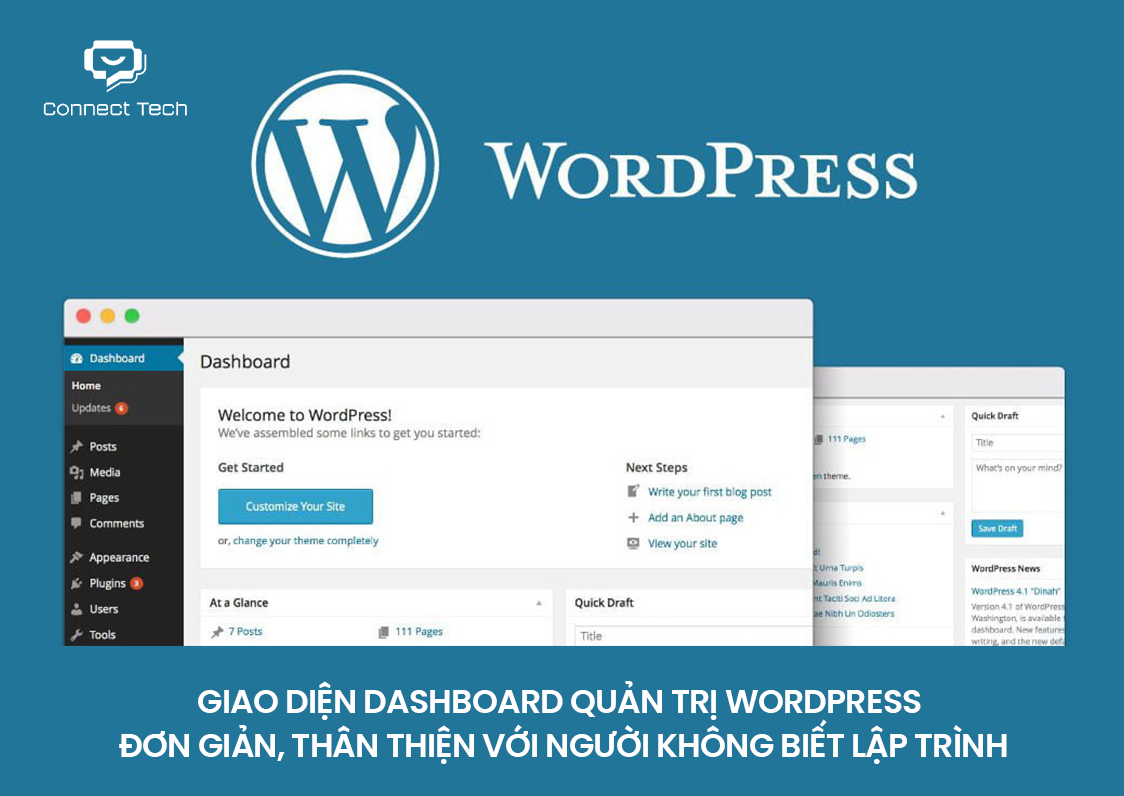
WordPress dashboard interface
What is Laravel? Its Strengths & Limitations.
Laravel is an open-source PHP framework, created by Taylor Otwell in 2011, following the MVC (Model-View-Controller) architecture. Unlike WordPress, Laravel is not a complete product out of the box, but rather a framework that allows developers to build web applications from the ground up, ensuring maximum flexibility and performance. It is an ideal platform for management software, SaaS applications, API backends, and systems that require extensive customization.
Strengths of Laravel
Laravel provides clean and elegant syntax, allowing developers to write code faster and with fewer errors. Its Eloquent ORM makes database interactions more intuitive, while the Blade Template Engine supports building powerful dynamic interfaces. More importantly, security is built into the core, from CSRF protection and SQL injection prevention to password encryption. For large-scale projects, Laravel makes horizontal scaling much easier, with support for tools like Redis, Queue systems, and Laravel Horizon to handle millions of requests without performance bottlenecks.
Limitations of Laravel
The biggest barriers are development cost and time. You need experienced PHP developers, and building even a basic website with Laravel can take 5 to 10 times longer than with WordPress. In addition, there is no built-in content management dashboard, meaning everything must be custom-built or integrated through packages like Filament or Laravel Nova. This is why Laravel is not always the most practical choice, even if it may seem more professional.
Connect Tech’s note: Many clients initially want Laravel because it sounds “more professional,” but after analyzing their actual needs, in about 70% of cases, WordPress is already sufficient and far more cost-effective.
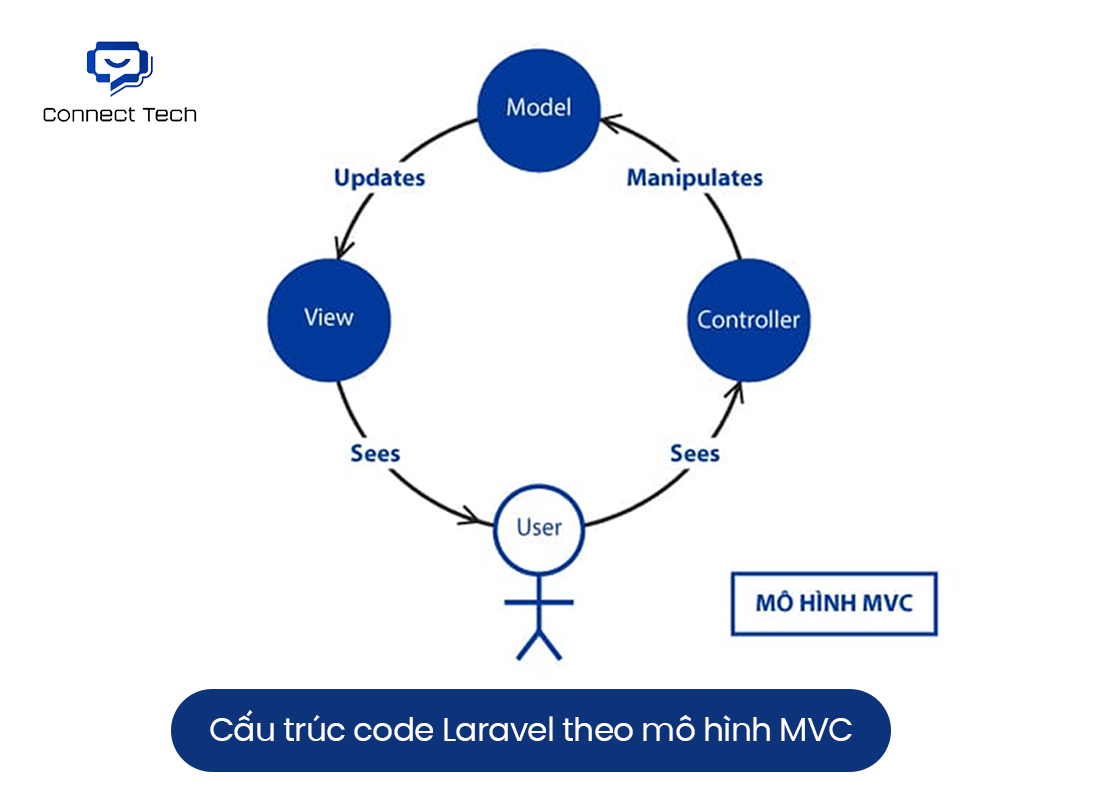
Laravel code structure based on the MVC (Model-View-Controller) architecture
When Should You Use WordPress and When Should You Use Laravel?
The real question is not “which one is better?” but “which one is more suitable for your project?” This is the principle Connect Tech has used for years when consulting clients based on real-world project experience.
Choose WordPress if you need:
A company profile website, product landing page, knowledge-sharing blog, news site, or a simple WooCommerce store — these are all areas where WordPress performs best. It is especially suitable when your budget is limited, you need to launch quickly, and your internal team wants to update content without depending on developers. A typical launch timeline is around 1 to 2 weeks.
Choose Laravel if you need:
SaaS platforms, internal management systems, complex booking applications, APIs for mobile apps, or systems with multiple user roles and customized business workflows — this is where Laravel truly excels. It is the better choice when your project needs to scale to thousands of concurrent users and security is a critical requirement. Development time usually ranges from 1 to 4 months depending on project size.
2026 Trend — Headless CMS
Many large-scale projects today combine both technologies by using Laravel as the API backend and WordPress or a headless CMS as the frontend/content layer. This approach allows businesses to leverage the strengths of each platform in the most efficient way.
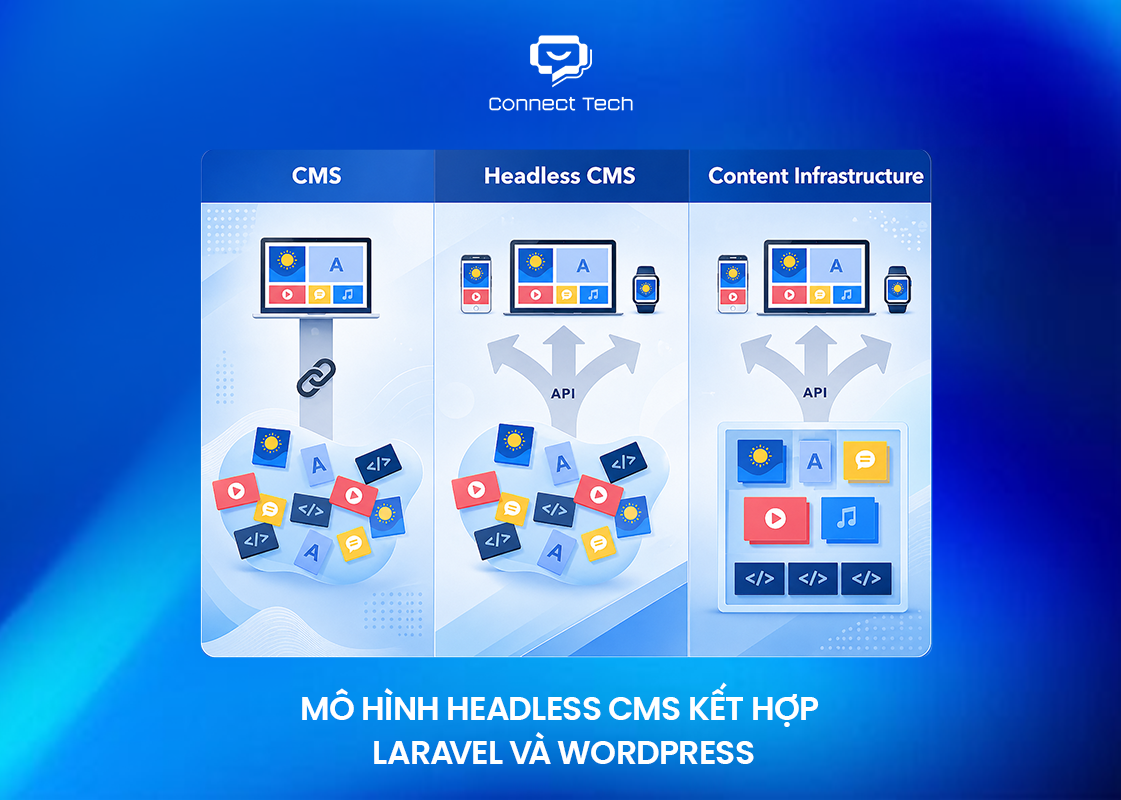
Headless CMS architecture combining Laravel and WordPress
Frequently Asked Questions About WordPress vs Laravel
Can WordPress do what Laravel does?
Technically, WordPress can be extended through plugins and custom code to handle more complex tasks. However, this is not the most efficient approach — similar to using a motorbike to pull a container. Laravel is designed from the ground up for complex business logic, delivering better performance and long-term maintainability.
Is Laravel good for SEO?
Laravel does not come with built-in SEO tools like WordPress, but it can be fully optimized for SEO if developers build it correctly — from page speed, URL structure, and dynamic meta tags to XML sitemaps and schema markup. Many Laravel websites rank highly on Google thanks to their superior performance.
Is building a website with Laravel more expensive than WordPress?
The initial cost of Laravel is usually 3 to 5 times higher than WordPress because it requires professional developers and longer development time. However, for complex projects, Laravel can save maintenance and upgrade costs in the long run due to its clean and scalable architecture.
Which is easier to learn: Laravel or WordPress?
WordPress is much easier to learn. Even users without programming knowledge can become proficient within a few days. Laravel requires a solid PHP foundation, understanding of OOP, MVC, and backend concepts, which often takes months to fully master.
Final Thoughts
Both WordPress and Laravel are excellent platforms, but they are built for completely different purposes. WordPress is the king of fast deployment, SEO, and cost efficiency, while Laravel is the irreplaceable choice when you need a powerful, secure, and highly scalable web application. Choosing the wrong platform from the beginning can cost you a significant amount in redevelopment, so it is always worth seeking expert advice before making a decision. Connect Tech is always ready to support you from the very first step.
Free consultation hotline: 077 317 5996
Email: info@connecttech.vn
Bài viết liên quan:
What Are Website and Web App? Detailed Distinction and How to Choose the Right One
What Is Website Structure? Why So Many SEO Websites Stay Messy for Years
What Is Laravel in Web Development? A Clear A-to-Z Explanation
Table of Contents
Related news

Professional & Affordable Real Estate Website Design to Increase Closing Rates
Professional, affordable real estate website design optimized for UX/UI, SEO, speed, and functionality — helping businesses build credibility, generate leads, and increase conversion rates.

Why Does a Website Have No Traffic? Causes & Effective Solutions
Why does your website have no traffic? Connect Tech analyzes the five most common causes and provides practical solutions to help your website generate sustainable organic traffic. Contact us for expert consultation today!

Website Lead Generation: How Many Leads Per Month? Calculation Formula
How many leads should your website generate each month? Connect Tech explains the lead calculation formula, industry benchmarks, and proven strategies to optimize your website for sustainable lead generation and higher conversions.

When Should You Upgrade Your Website?
Wondering when to upgrade your website? Connect Tech highlights 7 key signs, the benefits, and website upgrade costs to help businesses optimize performance, improve user experience, and retain more customers.

Does Your Website Need CRM Integration? A Complete Guide
Does your website need CRM integration? Connect Tech explains the benefits, the right time to integrate CRM, and the best implementation approach to help businesses improve customer management and sales performance.

What's the Difference Between a Rental Website and an Owned Website?
What’s the difference between a rental website and an owned website? Connect Tech compares costs, ownership, advantages, and limitations to help businesses choose the right solution. Get a free consultation today!





























